

You may think that all wireless computer keyboards are alike, but nothing could be further from the truth, especially if you spend many hours per day in front of your computer typing, or you’re an avid gamer.
The overall size, weight, design, and construction of the keyboard itself, the feeling of the individual keys when they’re pressed, the comfort level that’s offered while typing, and the sound the keys make while typing are all important considerations. And, if you’re a gamer, you also want features like adjustable actuation points, last key prioritization, hot swappable keys, RGB lighting, and N-key rollover — all features offered by the Keychron K8 HE keyboard.
For years, I’ve been impressed by the quality and performance of Keychron’s keyboards, so when the company sent me a review unit of the Keychron K8 HE TKL wireless magnetic switch keyboard, I was eager to test it out with my Windows laptop and MacBook Pro.
Right out of the box, it was obvious that a lot of thought and care went into the appearance and design of this keyboard. It wasn’t until I began using the K8 HE, however, that I discovered it also offers excellent performance, a quick response rate, and comfort as an everyday and gaming keyboard.
I was also immediately impressed by the connectivity options offered by the Keychron K8 HE, as well as the ability to quickly swap keycaps and switches. It was easy to initially set up the keyboard, customize its performance, and pair it with up to three devices.
If you’re looking to upgrade your existing keyboard, seek out one that’s loaded with features, and that offers excellent value for the price, eep reading my review of the Keychron K8 HE.
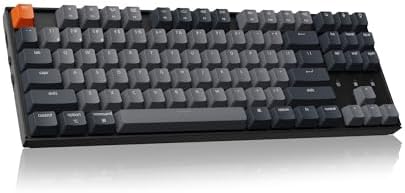
Keychron K8 HE TKL Wireless Magnetic Keyboard
Specifications
Price: $139.99.
Switches: Gateron Double-Rail Magnetic Switches.
Size: 80% Tenkeyless (TKL).
Frame: Aluminum, plastic, and wood.
Keycaps: Double-shot PBT.
Adjustable Actuation Point: 0.2 to 3.8mm with 0.1mm sensitivity.
Last Keystroke Prioritization and Snap Click: Yes.
Dynamic Rapid Trigger: Yes.
Hot-Swappable Keys: Yes.
N-Key Rollover: Yes for both wireless and wired connectivity.
RGB Lighting: 20+ backlight modes.
Connectivity: 2.4Ghz (1000Hz polling rate); Bluetooth 5.1; USB Type-C cable.
Compatibility: Windows, MacOS, iOS, Android.
Dimensions: 14.3 inches long x 5.09 inches wide x 1.35 inches thick (front height); 14.3 inches long x 5.09 inches wide x 1.61 inches thick (back height).
Weight: 2.56 pounds.
Pros
- Beautifully designed using aluminum and plastic with wood finishes.
- Comfortable typing experience.
- Relies on magnetic switches.
- Easily interchangeable key caps.
- Nicely weighted to stay in place on a desk.
Cons
- Labeling for switches on the side of the keyboard is difficult to see.
- Palm rest and carrying case sold separately.
- No matching mouse.
Keychron K8 HE Keyboard: Appearance

In a word, this keyboard is beautiful. It comes in a handful of housing and key color combinations, offers a modern and minimalistic-looking frame, and features wood accents on the left and right sides. When activated, the integrated RGB lighting offers more than 20 bright and colorful effects. As a result, this keyboard fits nicely in an office or at-home setting, as well as a gaming space.
The Keychron K8 HE is a tenkeyless keyboard (so there’s no numeric keypad). This allows it to provide an 80% size with OSA profile double-shot PBT keycaps that are easily customizable. While you can’t see it without removing the keycaps, this keyboard relies on Gateron double-rail magnetic switches that are extremely responsive, but more on that later. In total, this keyboard has 87 programmable and hot-swappable keys, including 12 Function keys and four arrow keys.
While the keyboard is fully customizable, it comes completely assembled, so you can begin using it within just two or three minutes after removing it from its packaging and following the steps outlined in the quick start guide.
The retail price of the Keychron K8 HE is under $140, but it looks like a keyboard that could cost two or three times that amount. As for its construction and performance, these are equally impressive and exude quality.
Keychron K8 HE Keyboard: Construction
If you’re a fan of traditional mechanical keyboards, you can expect enhanced performance from the Keychron K8 HE, thanks to the magnetics used in the redesigned switches. Instead of relying on physical contacts, magnetic sensors are used to measure actuation depth. This gives users more control over the response of every switch. And, yes, I found this to be a useful feature, especially when gaming.
For someone using the keyboard for typing, you can expect smoother and more comfortable performance than most mechanical keyboards. However, it’s the gamers who will truly appreciate the improved response rate of the switches. These pre-lubed Gateron double-rail switches provide more precise control than traditional mechanical switches.
From these switches, you get 0.1mm sensitivity and a 0.2mm to 3.8mm actuation range. Since the switches have a lifespan that exceeds 150 million clicks, the Keychron K8 HE Keyboard will likely last far longer than your computer.
For gamers, the keyboard’s individual keys can identify the difference between a shallow versus deeper keypress and react accordingly. In fact, for each key, up to four distinct actions can be assigned, based on press depth. There’s an analog mode, too, that provides controller-like precision when using the keyboard.
With added features like Last Keystroke Prioritization and Snap Click, gamers experience increased accuracy and speed when playing fast-paced, graphic-intensive games that utilize a high frames-per-second (FPS) rate. All of this is customizable from the Keychron Launcher web app.
My experience using the keyboard for gaming was smoother and more responsive than I expected it would be. For me, it was a welcome alternative to a traditional mechanical keyboard.

Every aspect of the Keychron K8 HE’s construction delivers top-notch performance. Integrated into the keyboard itself is a layer of 3.5mm thick EVA acoustic foam, EPDM foam, and a silicone pad that help to produce what I found to be a very satisfying, soft and “thocky” typing sound when individual keys are pressed.
Meanwhile, the PBT keycaps offer a nice contour that further enhances comfort while typing. Thanks to the magnets, the keycaps and switches are easy to swap out without fear of damaging them, since no excessive force is required.

Yet another standout feature offered by the K8 HE are what Keychron refers to as “enhanced stabilizers.” These rely on reinforced sidewalls around the stem for extra stability and a better connection between the switches and keycaps. This feature becomes readily apparent when pressing the larger size keys, like the spacebar, shift key, enter key, or delete key.

When I first held the keyboard in my hands, it was instantly obvious that premium materials are used to manufacture it, and a lot of research and attention was paid to the keyboard’s overall weight, design, appearance, and performance. It’s Keychron’s attention to detail that helps this keyboard stand out from the competition.
The weight of the keyboard itself (2.56 pounds) is enough to keep it from sliding around on a desk, especially when it’s being used aggressively for gaming.
Keychron K8 HE Keyboard: Connectivity

One of the things I like most about the Keychron K8 HE keyboard are the three connectivity options offered. You can use 2.5GHz or Bluetooth 5.1 wireless connectivity, or connect the keyboard directly to your computer using the supplied USB Type-A to USB Type-C cable.
When using a Bluetooth connection, up to three devices can be paired with the keyboard simultaneously, although gamers will want to use the 2.5GHz or cable connectivity to achieve the highest possible polling (response) rate of 1000Hz. When used in wireless mode, battery life is up to 110 hours (with RGB lighting turned off).

Keychron K8 HE Keyboard: Performance
The comfort experienced when typing, combined with the responsiveness and customizability of each key and multiple options for connectivity, allow the keyboard as a whole to adapt based on how it’s being used at any given time.
For me, it was easy to adjust the keyboard to provide an enjoyable typing experience for word processing, but quickly transform it into a gaming keyboard that can adapt to the specific game titles or the computer it’s being used with.

While it’s simple to turn off the RGB lighting when you’re trying to get work done, with a few key taps, it’s easy to select any of the more than 20 backlight modes using the Keychron Launcher Web Configurator, from which you can also adjust the lighting’s hue, saturation, brightness, and effect speed.

Keychron K8 HE TKL Wireless Magnetic Keyboard
My Final Thoughts: Is the Keychron K8 HE Worth It?
When it comes to choosing a keyboard, you have many options. But, if you’re looking for a well constructed, tenkeyless, and wireless keyboard that can handle your everyday computing tasks and serve as a quality gaming keyboard, I suggest setting your sights on the Keychron K8 HE.
The keyboard is priced around $140 (less when it’s on sale). As I’ve already mentioned, it’s extremely well constructed using premium components. It’s also comfortable to type on and has a beautiful aesthetic, which makes it a really good value, whether you plan to use it with a Windows PC or Mac computer, or an iOS or Android mobile device.
I’ve been very impressed by the performance, reactiveness, satisfying keyclick sound, and customization possibilities of the keyboard, plus it looks great on my desk. After spending several weeks using the Keychron K8 HE, I definitely recommend it. It’s also one of the most versatile keyboards I’ve ever used.
