

Avid readers, like myself, appreciate the different Kindle e-reader devices because what you get is more than a basic eBook reader. These devices offer a complete and rather intuitive ecosystem for readers (and those who enjoy listening to audiobooks and podcasts).
From a small, thin, and lightweight device with an e-ink display, users can access the Kindle Store and Audible to acquire eBook and audiobook titles, plus download podcasts.
When it comes to reading, these devices can hold thousands of full-length book titles. They also enable users to customize their reading experience by determining what font and typesize, for example, are used to display an eBook’s text. And thanks to their respective e-ink displays, users can clearly see text in virtually any lighting situation – from a dark room to outside in direct sunlight.
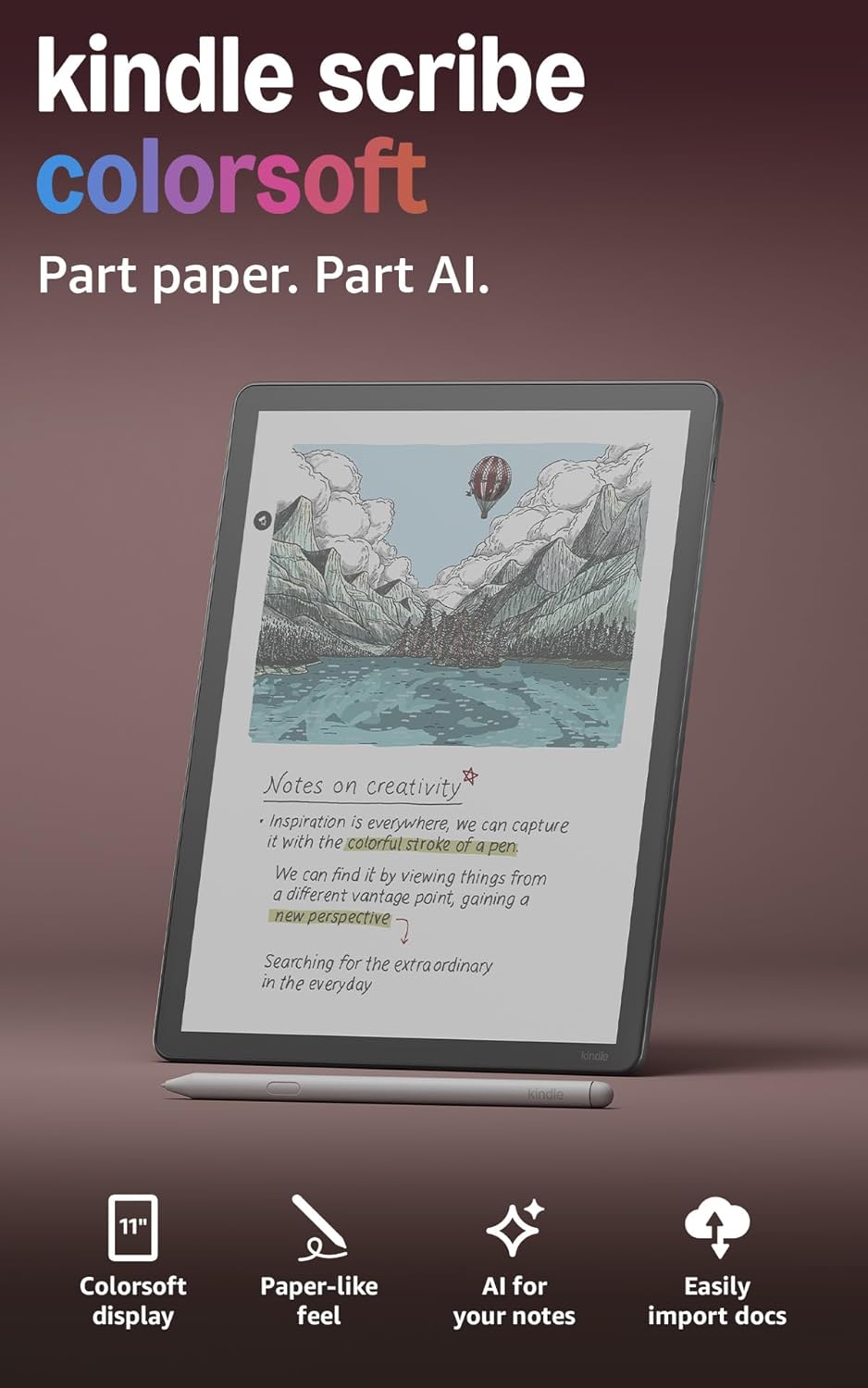
Amazon Kindle Scribe Colorsoft
For readers who are also notetakers and like to handwrite ideas, lists, journal entries, meeting notes, and other documents, the Kindle Scribe (2nd generation) device provides all of the features of a Kindle e-reader combined with digital notebook capabilities that are accompanied by lots of virtual note taking tools.
For readers who are also notetakers and like to handwrite ideas, lists, journal entries, meeting notes, and other documents, the Kindle Scribe (2nd generation) device provides all of the features of a Kindle e-reader combined with digital notebook capabilities that are accompanied by a plethora of virtual notetaking tools.
Until recently, Amazon offered the Kindle Scribe exclusively with an 11-inch, 16-level grayscale Paperwhite display. With the release of the Kindle Scribe Colorsoft in December 2025, Amazon upgraded this larger and more advanced Scribe with a full-color high contrast oxide (e-ink) display. I quickly discovered that adding color gives users a lot more options when it comes to both reading and writing using this type of device.
Over the past few years, I have reviewed and written about many Amazon Kindle devices, including both generations of the original Kindle Scribe. When Amazon recently sent me a review unit of the latest Kindle Scribe Colorsoft, I was anxious to see firsthand how much of an advantage a color e-ink display and a faster processor gives to users of this device.
Specifications
- Price: $630.
- Display Size: 11-inches.
- Display Resolution: 300 ppi (black & white), 150 ppi (color).
- Storage Options: 32GB or 64GB.
- Battery Life: Up to 8 weeks.
- Waterproof: No.
- Stylus: Premium Pen included.
- Auto-Adjusting Front Light: Yes.
- Charging Options: Wireless or USB Type-C cable (included.
- Wireless Connectivity: Wi-Fi, Bluetooth.
- Supported File Formats: Kindle Format 8 (AZW3), Kindle (AZW), TXT, PDF, unprotected MOBI, PRC natively; PDF, DOCX, DOC, HTML, EPUB, TXT, RTF, JPEG, GIF, PNG, BMP through conversion, Audible audio format (AAX).
- Cloud Service Support: Kindle, Microsoft OneDrive, Google Drive.
- Dimensions: 9.6 inches tall by 7.4 inches wide by 0.21 inches thick.
- Weight: 13.01 ounces.
Pros
- Most versatile Amazon Kindle yet.
- Easy-to-read, 11-inch, color e-ink display.
- Works as an eReader, audiobook/podcast player, digital notepad, and more.
- Offers an authentic, paper-like feel when handwriting.
- Thin and lightweight design.
- The battery lasts weeks between charges.
Cons
- Expensive.
- Protective case/cover not included.
It’s A Great Option for Avid Readers and People Who Enjoy Listening to Audiobooks and Podcasts
As an e-reader and audiobook player, the Amazon Kindle Scribe Colorsoft can handle the same tasks as the smaller size and less expensive Amazon Kindle Colorsoft ($280) – using a similar interface. However, the Kindle Colorsoft cannot also serve as a digital notebook or allow you to handwrite or draw directly on the device’s screen. It also does not support the ability to annotate or sign PDF files or Word documents using a stylus. Both devices, however, offer a color, non-glare display.
With the Amazon Kindle Scribe Colorsoft, you get the ability to shop for eBooks and audiobooks from Amazon’s Kindle Store, and can purchase one title at a time from a selection of over 15 million titles. Prices for individual eBooks are similar to what you’d pay for a traditional paperback or hardcover book.
The Kindle Store integrates access directly into all Kindle devices and requires a Wi-Fi internet connection to access it. However, once content is loaded into a Kindle, the internet connection is no longer needed.
That said, if you already own a Kindle eReader and upgrade to the Kindle Scribe Colorosoft, all the eBook and audiobook content you’ve previously purchased becomes readily available on the new device since they automatically sync.

For a monthly fee of $11.99, with Kindle Unlimited you get unlimited access to more than four million eBooks, audiobooks, digital magazines, and digital editions of newspapers. As long as your subscription remains active, you can store downloaded content within your device and have offline access to it.
But, if you prefer listening to audiobooks, the Kindle Scribe Colorsoft also works seamlessly with Amazon’s Audible service. Here, you’ll find audiobooks, podcasts, and other audio programming that you can access for a monthly fee between $7.95 and $14.95, depending on the plan you choose.

You can also acquire eBooks and audiobooks from your public library (for free) using the Libby service. However, if you choose this option, you’ll need to first download content to your computer, and then transfer it to your Kindle, as opposed to acquiring and downloading it directly using the Kindle.

The Kindle operating system used by the Kindle Scribe Colorsoft offers seamless integration between the Kindle Store, Audible, the ability to read eBooks and the tools for listening to audiobooks and podcasts. However, the Kindle Scribe Colorsoft can do much more.

Discover What the Amazon Kindle Scribe Colorsoft Can Do As a Notetaking Tool
Compared to most other Kindle devices, what sets the Kindle Scribe Colorsoft apart is its ability to serve as a versatile notetaking tool. From the Kindle Scribe Colorsoft’s home page, access the notebook functionality by tapping on the Notebooks option. You can then create as many custom-titled virtual notebooks as you need.
The device’s storage capacity is the only limit to the number of pages each notebook can contain. You also get 16 page templates. For example, you can choose between a blank page, one of several white or yellow ruled page designs, a multi-color daily or weekly planner template, a meeting notes template, graph paper, a template that’s ideal for managing to-do lists, a storyboarding template, and more.

After creating a notebook or individual note page, you can use the included stylus to handwrite or draw directly on the screen. This nicely replicates the experience of writing on paper using a pen, pencil, fountain pen, marker, or highlighter. And since the Amazon Kindle Scribe Colorsoft offers a color display, you’re able to choose your virtual ink color, too.
If you don’t like the appearance of your own handwriting, this device can take what you’ve written and transform the text into an elegant and easy-to-read script font, which is especially nice if you have messy handwriting.
I also love the fact that while creating handwritten notes, you can choose from 10 virtual ink colors, five highlighter options, and take advantage of a shader tool to create subtle gradients and overlays when drawing on the screen.
Switching between virtual writing tools, ink thickness, and ink colors is as simple as pressing the button on the side of the stylus that comes with the device. You can also use the menu on display.

Once you’ve written one or more pages of content, the Kindle Scribe Colorsoft can summarize your text using AI, plus convert handwritten notes into editable text. You can search handwritten and text-based notes. Plus, all your notes and notebooks automatically sync with your free Amazon cloud account.
At any time, you can also share notebooks or individual pages with selected other people via email directly from the device when it’s connected to the internet.
Whether you’re holding the Kindle Scribe Colorsoft in your hands, or have it lying on a flat surface, notetaking, creating to-do lists, writing journal entries, or creating drawings or sketches is a comfortable and straightforward process.
Ways Businesspeople Can Use the Kindle Scribe Colorsoft
The Amazon Kindle Scribe Colorsoft is more than just a basic digital notebook. Importing PDF files or Word documents into the device is a simple process. Those documents can then be read, annotated, highlighted and signed (using your own digital signature). It’s these tools that make this device a versatile productivity tool for business people.

When annotating a PDF file or Word document, you can highlight text using a virtual highlighter in the ink color of your choice, or select a virtual ballpoint pen, for example, and annotate that document.
For someone who needs to review and edit reports, articles, documents, lists, proposals or other work-related content, using the Kindle Scribe Colorsoft is more convenient than working with a laptop, plus much easier on the eyes than a traditional tablet.

While annotating a PDF file or Word document, you can also draw directly on the screen, as needed. Do this using the virtual writing tool and ink color of your choice. And if you’re reviewing correspondence or a contract that needs to be signed, you can do this too, before sharing that document with others via email, all directly from the Kindle Scribe Colorsoft. This makes the device a useful productivity tool. I also like that it’s possible to add notes to eBooks using your own handwriting.
The ‘Send to Kindle’ Feature Is Extremely Convenient
Transferring PDF files (with full-color or black and white content) to your Kindle Scribe Colorsoft is easy with the ‘Send to Kindle’ feature. Amazon assigns your Kindle its own email address, so you (or anyone else with this address) can email PDF files that will appear within the device in minutes, and you can then access them using the Scribe Colorsoft.
Once you have reviewed, annotated, or signed a PDF file, for example, you can share it with others directly from the Scribe using email. All PDF files can also automatically stay synced and secure using Amazon’s cloud-based storage. I found this workflow to be straightforward and efficient.
Send Documents Directly from Microsoft Word
For anyone who subscribes to the Microsoft 365 service and uses Microsoft Word to compose and share text-based documents, when you use a Kindle Scribe Colorsoft, it’s possible to share documents wirelessly directly using Word’s Share feature. Users can then view, annotate, and share documents with others directly from the Scribe Colorsoft when it’s connected to the internet via Wi-Fi.
Who Will the Amazon Kindle Scribe Will Appeal To?
I recommend the Kindle Scribe Colorsoft to anyone who loves reading, enjoys listening to audiobooks and also wants the ability to create and organize handwritten notes, to-do lists, and other documents on a single device. As an e-reader and audiobook player, the Kindle Scribe Colorsoft uses the same intuitive interface as the other Kindle e-readers.

As someone who has been writing about consumer tech gadgets for more than 30 years, I’ve had the opportunity to try most of the e-reader and digital notepad devices on the market. I’ve always been a fan of the Kindle devices when it comes to using them as an e-reader and audiobook player.
However, for the past year or so, whenever I’ve needed a digital notepad, my go-to device has been the reMarkable Paper Pro ($679) or reMarkable Paper Pro Move ($499). These devices also offer a full-color and glare-free e-ink display. They also rely on a well-designed interface for creating and managing virtual notebooks that can contain any number of individual pages.
While they are excellent digital notepads, the reMarkable devices can’t play audiobooks. They also have limitations when it comes to reading eBooks, which is functionality the Amazon Kindle Scribe Colorsoft handles exceptionally well.
After testing the Kindle Scribe Colorsoft’s notetaking capabilities, I found them to be slightly different, but equally as useful as those found in the reMarkable Paper Pro devices. This was not the case with the first and second generations of the Kindle Scribe that lacked the color display, however. The size and weight of the Kindle Scribe Colorsoft is ideal for using it as a digital notebook, since it’s about the same as holding a traditional letter size notepad.
I also discovered that the stylus that comes with the Kindle Scribe Colorsoft is the right size and weight to mimic working with a traditional pen, which makes the on-screen handwriting experience feel authentic.
Thus, for someone who wants an e-reader, audiobook player, digital notepad, and a device that allows them to view, annotate, and share PDF files, the Kindle Scribe Colorsoft – with its full-color display is a wonderfully investment and useful tool.
A less expensive option is the Amazon Kindle Scribe ($400), which offers similar functionality, but lacks the full-color display which I found to be very useful. Having used both devices, the ability to read eBooks and digital publications and see them in color – the way the publisher intended users to view them – is a huge advantage. Plus, being able to handwrite notes and switch between ink colors gives the notetaker many more creative options.
My Final Thoughts: Is the Amazon Kindle Scribe Colorsoft Worth It?
It’s true that an Apple iPad or almost any Android tablet can replicate the functionality in the Kindle Scribe Colorosoft when it’s used with the Kindle app and a separate notetaking app (such as Noteability). However (with the exception of the TCL NXTPaper 14 tablet, for example), a traditional tablet’s display does not offer the same virtually glare-free viewing experience as the Kindle Scribe Colorsoft.
Amazon Kindle Scribe Colorsoft
Any traditional tablet user knows that trying to view what’s on the screen when outdoors in direct sunlight is virtually impossible, and when indoors, after a long reading session, it’s common to experience eye fatigue. When using the Kindle Scribe Colorsoft, neither of these problems exist thanks to its e-ink display. Plus, instead of mere hours, the Kindle Scribe Colorsoft’s battery lasts several weeks between charges.

After experiencing first hand all that the Kindle Scribe Colorsoft has to offer, the device is well-designed, reliable, and versatile. It’s a nice step up from the older Kindle Scribe models. It’s also a great option for someone who wants to begin using a digital notepad for the first time. As an incentive to try out the Kindle Scribe Colorsoft, if you purchase it directly from Amazon and have an older e-reader to trade in, you will receive a 20 percent discount off the Scribe Colrosoft’s purchase price, plus an Amazon gift card for the value of your old device.
