
What happens when you’re in a meeting, on the phone, working out at the gym, watching TV, or walking your dog, for example, and a brilliant idea pops into your head? Or, maybe you’re out and about and suddenly remember to add milk to your grocery shopping list and don’t want to forget. Perhaps you need to associate an alarm with a specific task that’s important for you to complete. If you have an active mind and need a way to jot down ideas, create lists, plus gather and organize information, MindChuk offers a simple and straightforward solution. Think of MindChuk as a user-friendly app that works like a digital version of Post-It sticky notes, but all of your notes take on a digital form, are searchable, and can be accessed from a single app.
For weeks, I had been seeing a bunch of ads for this “brain dump” app online. What caught my attention was its flexibility, customization options, and low cost. You can purchase MindChuk for a one-time fee of $55. After that, there are no additional subscription costs.
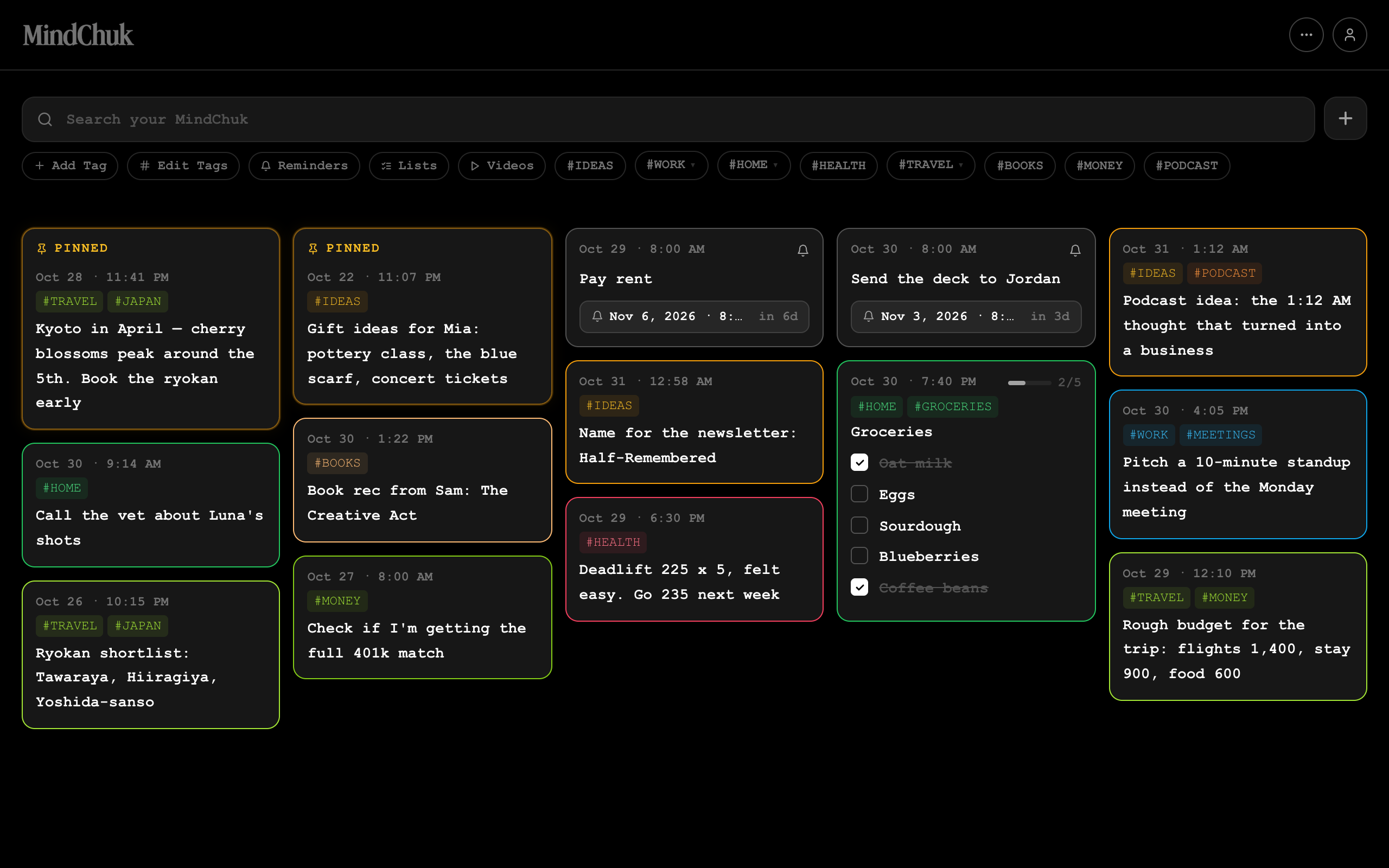
What you get is full access to this cloud-based app that works using any web browser. This means it’s easy to access from your smartphone, tablet, laptop computer, and desktop computer, but all of the information you store within the app remains private. All of your up-to-date entries and lists automatically load whenever you launch the app, so you can view, organize, edit, and use the information that’s been stored within it. You can also customize the main Dashboard view, so you determine how your entries get displayed on the screen. There are five distinct viewing formats and a few adjustable viewing options that you can switch between on the fly.
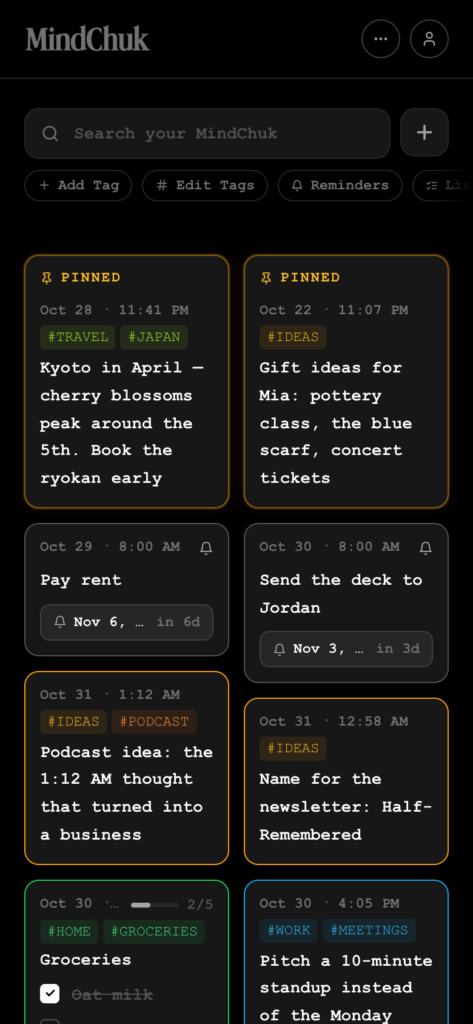
After purchasing MindChuk online from the company’s website, I set up my account and started using the app in less than five minutes. There is nothing to download, and the set-up process is very intuitive. In fact, the entire interface used to interact with this app is straightforward, especially for someone who’s not tech-savvy. There are no fancy bells and whistles, extensive menus, or undescriptive icons integrated into the app. It’s the simplicity of its design that makes MindChuk a pleasure to work with.
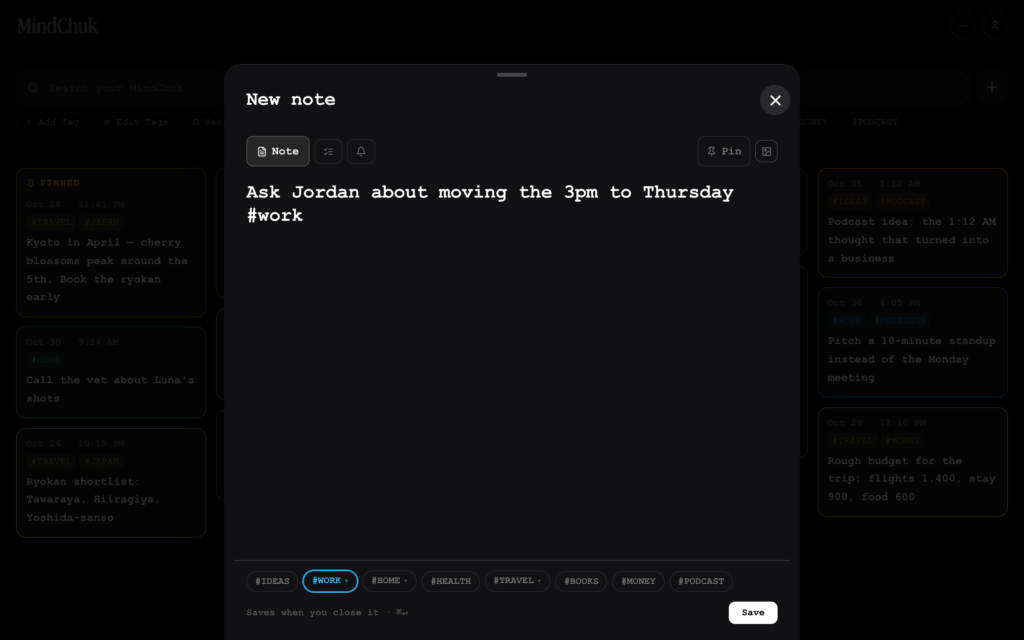
Once the initial setup process was done, I immediately started entering ideas as they popped into my head, as well as text-based information gathered from other sources (and then cut-and-pasted into the app). Entries can include photos, website links, addresses, and phone numbers, for example. Each entry becomes simple to find, sort, and view later, especially if you associate custom and color-coded tags with them.
As someone who deals with a lot of information every day and needs to keep it all organized, MindChuk quickly adapted to my lifestyle and needs. After all, I pretty much always have my iPhone with me, and spend much of my day working with either an iPad, laptop, or desktop computer, too.
One useful feature (which is optional to use), is that included with a MindChuk account is a unique phone number and special email address that’s associated with it. Using this phone number, you can use the Messages app on your mobile device to send content directly to the app, just as you’d send an SMS text message to a friend or assistant. This can also be done from within WhatsApp, or from your registered email address, you can just as easily send content directly into the app via an email message. The alternative is to launch the app using any web browser and then, from its main Dashboard, click on the Add icon to create a new entry.
Keep reading to learn more about how you can incorporate this “brain dump” application into your life to help you keep track of information, ideas, lists, and other content you might otherwise forget, or that you need quick access to.
Specifications
- Price: $55.
- Ongoing Subscription Fees: None.
- Supports: All web browsers (Windows, MacOS, iOS, and Android).
- Secure cloud-storage support: Yes.
Pros
- Provides an excellent replacement for Post-It note reminders.
- Intuitive interface.
- Extremely affordable.
- Organize your content using color-coded tags.
- Send content directly to the app via text message.
Cons
- Only one central database per user.
- No dedicated mobile or desktop app (yet).
- Base license includes 2,000 inbound SMS messages.
What is a “Brain Dump” App?
As this app description suggests, MindChuk is designed for someone with a busy mind who wants or needs to be able to unload information from their head into an app quickly and efficiently, any time and anywhere. What’s nice about this app is that it accepts freeform text, so you can create an entry with just a few words, one sentence, or write a few paragraphs or full pages.
Other options for creating an entry are to:
- Cut-and-paste content from another document or source (such as a website or social media feed) into the app.
- Add a link to a website or YouTube video so you can refer back to it later.
- Create a list with multiple items.
- Add photos to an entry with or without accompanying text.
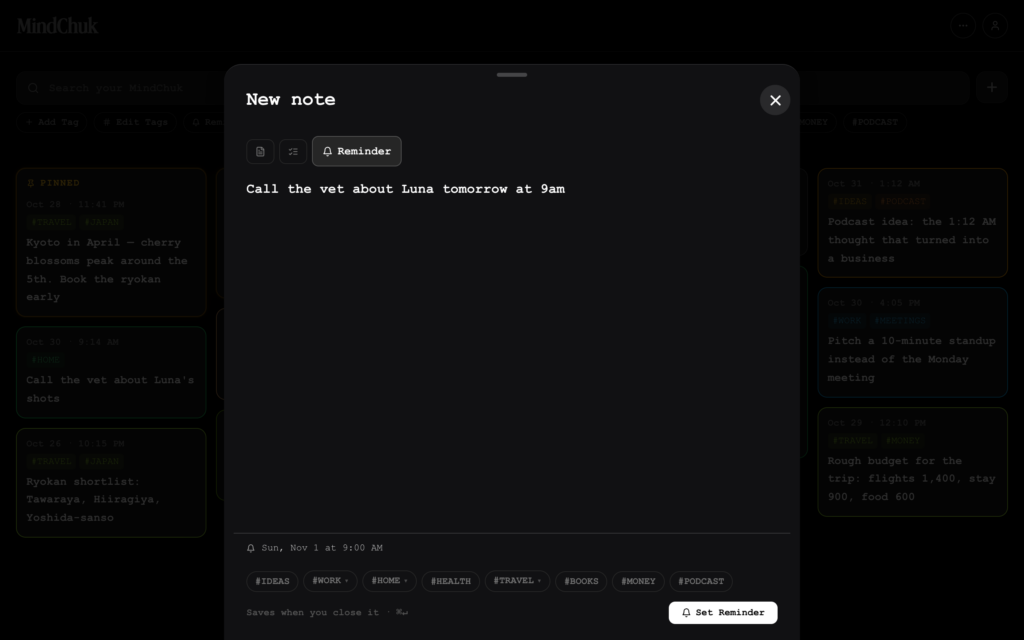
- Add a Reminder to an entry that’s associated with a specific date and time (or make it a recurring event).
Each entry takes on the appearance of a box on the Dashboard screen. By associating custom tags with an entry, you can later sort and view them by category and color-code entries for quick visual identification. The time and date each entry was created automatically gets linked, so you can also sort and view them by date later. The design of MindChuk allows people to use the app in a way that meets their established personal or professional workflow, as opposed to changing that workflow to accommodate the design of the app.
As a result, as information or ideas pop into your head, or you come across useful information you want or need to remember while surfing the web, managing emails, or performing research, everything can be quickly stored digitally in a way that makes it easy to find and retrieve later. MindChuk is not a word processor or full featured scheduling application. Instead, it’s a way to ensure that you never lose track of important information and content.
Who Should Be Using MindChuk?
During the time I’ve spent using MindChuk, I’ve discovered all sorts of ways to incorporate the app into my personal and professional life when it comes to gathering, sorting, viewing, and working with information. Users are given a tremendous amount of freedom when it comes to manually entering or cutting-and-pasting text into an entry. The developer promotes MindChuk as an app designed for people with “minds that never turn off,” but also recommends it be used by people with ADHD (or with an overactive mind), as well as on-the-go thinkers.
In my opinion, the types of people who will find MindChuk useful include content creators, developers, AI users (for remembering prompts), business operators, entrepreneurs, designers, writers, researchers, and students. Again, because users have a lot of freedom when it comes to creating, organizing, and then displaying content, this makes MindChuk easily adaptable to almost anyone’s needs.
Ways to Use MindChuk in Your Everyday Like
I found the trick to getting the most out of MindChuk is to take full advantage of descriptive and color-coded tags that can be associated with each entry. Since you can associate multiple tags with an entry, you can create a tag that describes the type of content that’s included, the name of a project the entry is associated with, and then add an additional tag that describes its importance. For example, if you’re creating a grocery shopping list, you can add the tag “#Groceries” to the entry, and then format it as a list. You can also create a group of tags that allow you to identify the importance of an entry, such as “#Urgent”, “#Important”, or “#Non-Essential,” and then add a specific color to those tags.
This allows you to later sort and view content based on specific tags, or keywords found within the content. Being able to add a Reminder to specific entries causes the app to generate an alert at the time and date you request. This is yet another way you can keep important information and responsibilities from falling through the cracks. MindChuk also makes it easy to locate and view entries by typing a keyword or phrase into the Search field, which is always displayed near the top of the main Dashboard.
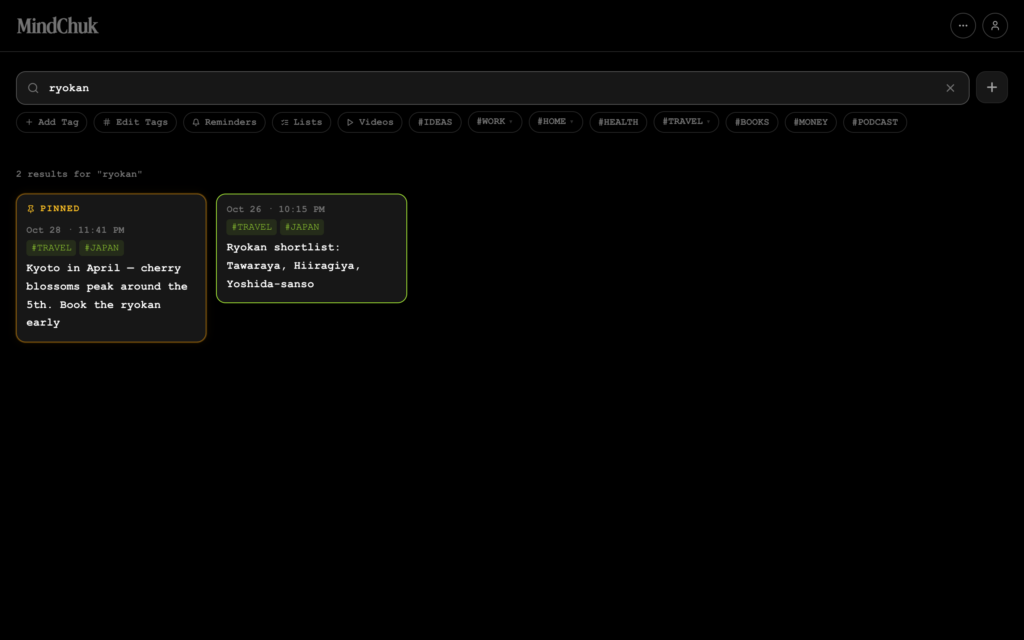
If you adopt MindChuk into your life, once your account is set up, invest 10 to 15 minutes in reviewing the app’s online tutorial to discover all of its features and how to use them effectively. To access this, click on your account icon in the top-right corner of the browser window. Next, click on the Support menu option, and then click or tap on Help Center.
Any time you integrate a new digital tool into your life, it’s important to get into the habit of relying on it for its intended tasks. In other words, if you’re using it as a replacement for placing sticky notes on and around your workspace (or writing down ideas in a traditional notebook) to keep track of important things you need to remember, once you start using MindChuk, get into the habit of adding all of the necessary content into the app and stop using those sticky notes or notebook altogether. This way, everything gets stored in one place and you no longer have to worry about misplacing individual sticky notes.
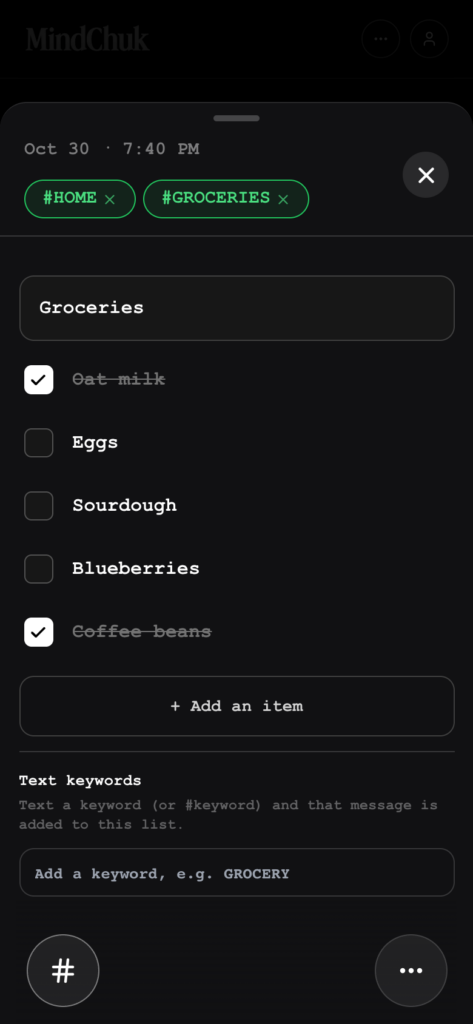
When it comes to creating lists, you can start a new entry and use a list format. To do this, select the New Note option, and then tap on the List icon. Enter the List Title (such as “Grocery Shopping,” “Today’s To-Dos,” or “Important Calls,” and then add one item to the list at a time. Then, you can easily add items to that list later, either by manually typing them into the appropriate entry within the app itself, or text messaging the app with those list additions.
To do this, start composing a new text messaging using the Messages app on your phone, and send it to your MindChuk account’s unique phone number. Then, within the body of the text — one at a time — type each new list entry for an already-created list into that text massage, followed by the hashtag associated with that list (such as #Groceries). Upon sending the text message to MindChuk, the app will add those new entries into the existing list automatically.
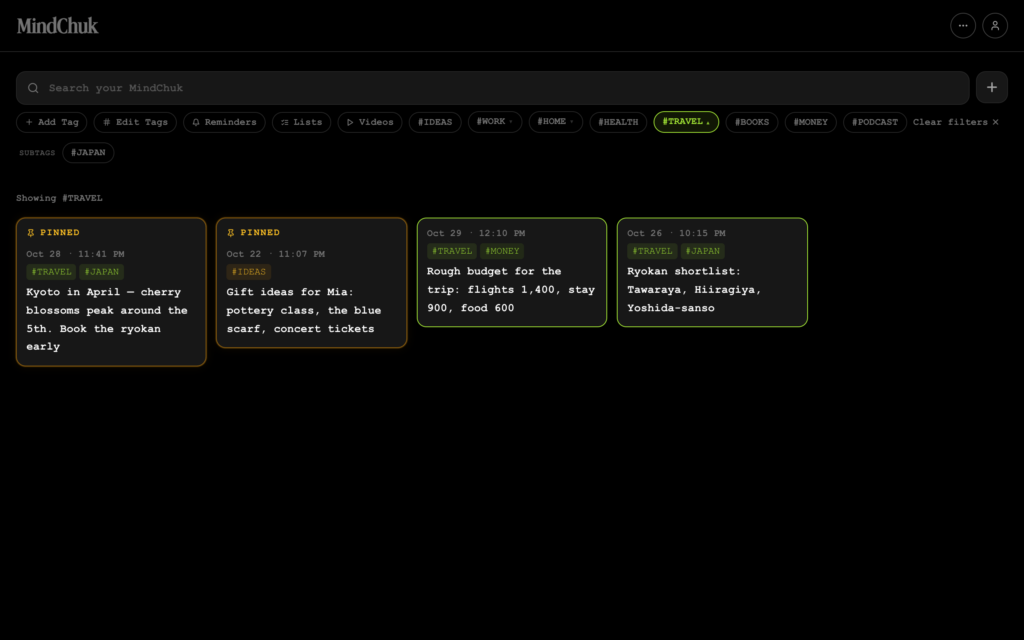
Yet another option for highlighting entries that are important (and that you want even faster access to) is to create the entry and tap or click on the Pin icon. Doing this causes that entry to automatically appear under the Pinned heading, located near the very top of the Dashboard. These pinned entries keep their prime viewing location, regardless of how you later sort and opt to view all of the other entries.
Is MindChuk Secure?
For the most part, yes. MindChuk has a handful of integrated security features. For example, all content is stored in a centralized Supabase database that relies on Row-Level Security (RLS). This helps to ensure that only the registered user can access their own content. According to the developer, all data that gets transmitted between a user’s devices and the MindChuk servers are protected using TLS encryption. Plus, all access to a user’s account requires verified authentication.
Because content can be entered into the app in a handful of ways, many of which are not end-to-end encrypted, users should think twice about storing highly confidential information, such as account passwords, banking details, Social Security or credit card numbers, or personal health records. If you plan to use MindChuk to store private or confidential information that needs to be kept secure, I suggest reading the developer’s Privacy Policy first.
My Final Thoughts: Is the MindChuk Application Worth It?
There are many apps out there that allow you to collect, sort, and organize information. The closest competing apps to MindChuk are Hippo and Obsidian. These two apps are a bit more feature-packed and have a slicker-looking interface. Some other apps have a subscription fee associated with them, so this winds up costing more money over time. Also, you can also easily find other robust and polished apps used to manage your schedule or keep track of to-do lists.
The problem with many of these options is that they’re either platform specific (just for Windows, Mac, iOS, or Android devices), or require a learning curve to get the most out of using them. Because MindChuk lacks many of the specialized features and artificial intelligence tools you now find integrated into so many apps, it provides an easier way to enter, organize, and then keep track of a lot of information. The learning curve for becoming proficient using this app is mere minutes.
Since I started using MindChuk about three months ago, I have seen it continue to evolve. The developer regularly introduces new features, many based on requests from users. (Any emails to the developer with questions or feature suggestions receive a personalized response very quickly.) Because this is a cloud-based app, the user never needs to install updates. Each time the web-based app is launched, you’re always working with the latest version.
After reading the developer’s blog, I learned that plans are underway to introduce a dedicated mobile and desktop app for MindChuk, but I found that by simply creating a website shortcut and displaying it on my mobile device or computer’s Home screen, this nicely replicates using a traditionally-installed app.
MindChuk does have a few limitations, especially when it comes to sharing and printing multiple entries at the same time. There are also certain types of content that cannot yet be attached to an entry (such as a PDF or audio file), but according to the developer’s blog, these and other features are in the works. There’s also currently a 2,000 SMS message limit for sending content into MindChuk via a smartphone.
For me, the biggest drawback is that all entries ultimately get stored within a single database. You can’t set up separate databases for specific projects, or personal versus work-related content. You can, however, sort all entries using one or more tags, but when you look at the Dashboard without sorting the content, all of your entries appear on the same screen (with some scrolling likely needed to see all of them.) That said, the one-time purchase price of $55 is more than fair, and makes MindChuk an excellent value for the investment.
I continue to enjoy and benefit from my experience working with MindChuk. Thus, I highly recommend it as a way to help organize your busy mind. While MindChuk does not offer a free trial in the traditional sense, it does come with a 30-day money-back guarantee, so new users have nothing to lose by giving this app a try.
