

This really just comes down to budget: $449 for just a console, or even $499 for a console that comes with one game, is expensive. The original Nintendo Switch is currently $299 and the Nintendo Switch Lite is $199. Will your child appreciate a Nintendo Switch 2? Absolutely. Is it practical for your family’s financial situation? That’s up to you.
-
- It’s a lot bigger.
-
- The screen has higher quality than the original Switch, but the Nintendo Switch with the OLED screen is still the best so far.
-
- The controllers are bigger.
-
- It has a microphone.
-
- It has a better kickstand.
-
- There are two USB-C charging ports instead of one.
-
- The display is much better on a TV.
For me personally? No. The original Nintendo Switch I’ve owned for five years has over 400 GB of data stored between the MicroSD and the device itself. From just my testing period, I’ve only got 187 GB left out of the 256 GB the Nintendo Switch 2 came with. While Nintendo has a 256 GB microSD Express card for sale, I feel that isn’t going to be enough, either. If you plan to use the Nintendo Switch 2 thoroughly for years to come, due to the increased file size of games, in addition to some games being Game-Key cards that require the game to live on your device, the Nintendo Switch 2 should have a 1 TB microSD Express card in it.
-
- A second Joy-Con 2 controller would be necessary in order to play games with friends and family at home.
-
- While at the time of writing this, Nintendo doesn’t have an official charger for four Joy-Con 2s at once, I feel they will release one of those as well, which would be a necessity for any Nintendo Switch 2 owner.
-
- A carrying case would definitely be something that a traveler or a child would need to protect their Nintendo Switch 2. However, I don’t feel that this one needs to be contained to the Nintendo OEM ecosystem. I would probably purchase a carrying case that comes with storage slots for your games, though.
-
- Some players like the look and feel of the Nintendo Switch 2 Pro Controller, so that could be an option.
While I was able to get my Nintendo Switch 2 console on release day at GameStop, the Nintendo Switch 2 console is also available at Target, Best Buy, Walmart, Nintendo, and Costco.
In My Expert Opinion
Is the Nintendo Switch 2 worth getting? Absolutely, if you have the budget for it, are a casual gamer, want to play a console with friends, love Nintendo, or have children who would enjoy it. If you’re a more hardcore gamer who loves PS5 and X-Box and are obsessed with graphics, this console may not be for you. But for everyone else, it’s a blast.
Whether you’ve been a gamer your entire life, are a casual gamer, or are looking for a safe device for your children, this review is for you. I’ll be covering all the details about the Nintendo Switch 2 from my experience and including the feedback of others.
First off, I want to share my video game experience. Growing up, my grandfather — who took the role of my father — bought me all the gaming consoles and games I could ever want, from the original Nintendo, SNES, and Gameboy to the Playstation and Playstation 2. I took a hiatus from gaming in my 20s but got back into gaming during Covid when there was literally nothing to do.
I soon bought my first Nintendo Switch — the original version with an Animal Crossing skin on it. I think I’ve bought about 50 games for that device: Some of them kept my attention, some didn’t. Some, though, I played from the moment I woke up to the moment I slept, until I’d completed them. Long story short, I know my way around a Nintendo product, so with that, let’s get into the Nintendo Switch 2.
Nintendo Switch 2 Specs
Specifications
- Dimensions: 4.5 inches tall x 10.7 inches wide x 0.55 inches thick.
- Weight: 0.88 lbs (1.18 lbs with Joy-Con 2 controller attached).
- Screen: Capacitive touch screen, 7.9-inch wide color gamut LCD screen, 1920×1080 pixels, HDR10 support VRR up to 120 Hz.
- CPU/GPU: Custom processor made by NVIDIA.
- Storage: 256 GB.
- Communication features: ireless LAN (Wi-Fi 6) Bluetooth In TV mode; can be connected using the wired LAN port on the dock.
- Video output: Output via HDMI connector in TV mode maximum of 3840×2160 (4K) resolution at 60 fps (TV mode).
- Audio output: Supports linear PCM output 5.1ch Output via HDMI connector in TV mode.
- Speakers: Stereo.
- Microphone: Built-in microphone (monaural) with noise cancellation, echo cancellation, and auto gain.
- USB-C connectors: 2.
- Audio jack: 3.5mm 4-contact stereo mini-plug (CTIA standard).
- Game card slot: oth Nintendo Switch 2 and Nintendo Switch game cards can be inserted.
- microSD Express card slot: 1.
- Sensors: Accelerometer, gyroscope, and mouse sensor located in Joy-Con 2 controllers. Brightness sensor located in console.
- Internal battery: Lithium-ion battery/5220mAh.
- Battery life: Approx. 2-6.5 hours.
- Charging time: Approximately 3 hours.
- Price: $449.99.
What Comes in the Nintendo Switch 2 Box

What You’ll Find in This Review
Nintendo Switch 2 Console First Impressions
The Ports, Buttons, and Kickstand
Game Cards, Game-Key Cards, and Downloadable Games
Taking Screenshots and Recording Videos
Frequently Asked Questions (FAQ)
Nintendo Switch 2 Console First Impressions
For the five to 10 minutes it took to set up the device, it felt good in my hands, feeling similar to the original, despite being a bigger device. Later, as I began to seriously test it out, I noticed that the heavier weight did become slightly uncomfortable at times — I soon got used to it, but I do wonder if it will be too heavy for some kids to use comfortably. Overall, though, the quality and build of the device are great and the screen is a good size.
The setup process is quite straightforward — you just follow the onscreen prompts. While the process of inserting the power and HDMI cables into the back of the dock is somewhat better than with the original Switch, it still isn’t that great, and you could easily break one of the tabs that holds the door closed if you’re too rough with it. (I would do everything possible to protect that dock, because as of the time of writing, a replacement for that dock is going to cost $119.99.)
For Switch owners who want to transfer over their old game data to the new console, you’ll mostly be fine. I tested older games like Mario RPG, Pokemon, etc. (more on that later) and they worked fine and had the correct save data. Bayonetta 3 didn’t, however, so be warned.
The Joy-Con 2 Controller for the Nintendo Switch 2
I spent close to a decade working in the automotive industry, and one thing you learn is the importance of quality and workmanship. I’m happy to report, then, that the Joy-Con 2 controllers are high quality. They have a glossy finish that feels nice in your hands, and are the right size for easy holding and handling. The best part is the way they snap right into the Nintendo Switch 2 console: The sound the magnets make when the controllers are inserted into the console is incredibly satisfying, and a big upgrade from the original Nintendo Switch’s plastic-y sliding approach. On the downside, plugging the Joy-Con 2 controllers into the straps isn’t as intuitive as it seems, requiring a surprising amount of precision to make them connect.
You can use the Joy-Con 2 controller in multiple ways:
- Both halves attached to the Nintendo Switch 2 in handheld mode.
- Both halves attached to the Joy-Con 2 Grip that comes with the console.
- Separately, as two controllers, using the Joy-Con 2 Straps.
- Inserting both halves into an accessory, like a Joy-Con 2 Wheel steering wheel.
- Using it as a mouse.

Both halves of the controller feature an analog stick, while the left one displays up, down, left, and right buttons, and the right one displays the A, B, X, and Y buttons (when being used independently, they function identically). The controllers also feature an L and LZ button (left) and an R and RZ button (right). There is also an SL and SR button on each side as well, along with a tiny circle button, which syncs the controller to a console, in between those two button locations.
Exclusively on the left controller, you will find a – button which acts as a select button, and a circle button which can be used to take screenshots (and can also be used to record 30-second clips of video play — more on that later). Exclusive to the right controller is the + button, which acts as a start button, a home button to get you back to the home screen of your console, and a C button, which brings up Game Chat.
Behind the controller, you will find a release button that you can push down on to release the Joy-Con 2 controller from the console, grip, straps, or an accessory.
The controller can also be used as a mouse, although at the time of writing, no games have been released that fully take advantage of this feature.
You can use the original Nintendo Switch Joy-Cons on the Nintendo Switch 2, as well, but the process isn’t intuitive. Once you’re on the screen where you connect your controllers, instead of holding the top left and right buttons, you have to hold down the small, circular connect buttons. Do this, though, and they do connect and they do work.
Reliability and Stress Tests
The original Joy-Con had a problem with drifting, where the analog sticks would move on their own, even when not being touched. Sometimes, resetting could resolve this — other times, the Joy-Con would need to be replaced. Curious if this was still an issue with the new model, I watched a video where someone who repairs Joy-Cons opened up the Joy-Con 2 to show the hardware that they used. Their conclusion, based on the materials used, was that these drift issues could still persist. Only time will tell.
If these drifting issues do occur, it’s not yet known whether Nintendo will replace them. However, at $94.99 (at time of this writing) for a replacement, I really hope they do.
In addition to the potential drift issue, I watched footage of someone trying to yank the controllers off of the console itself without pressing the release buttons. They succeeded without damaging either device, but I wouldn’t want to bet on how many times you can do this before it breaks. It does seem like Nintendo thought through a lot of use case situations where the Joy-Con 2s could be damaged, and mitigated as much of that damage as possible: Personally, in fact, I think these are the best controllers I’ve used out of all my systems.
Display and Gameplay Quality on the Nintendo Switch 2
On the TV
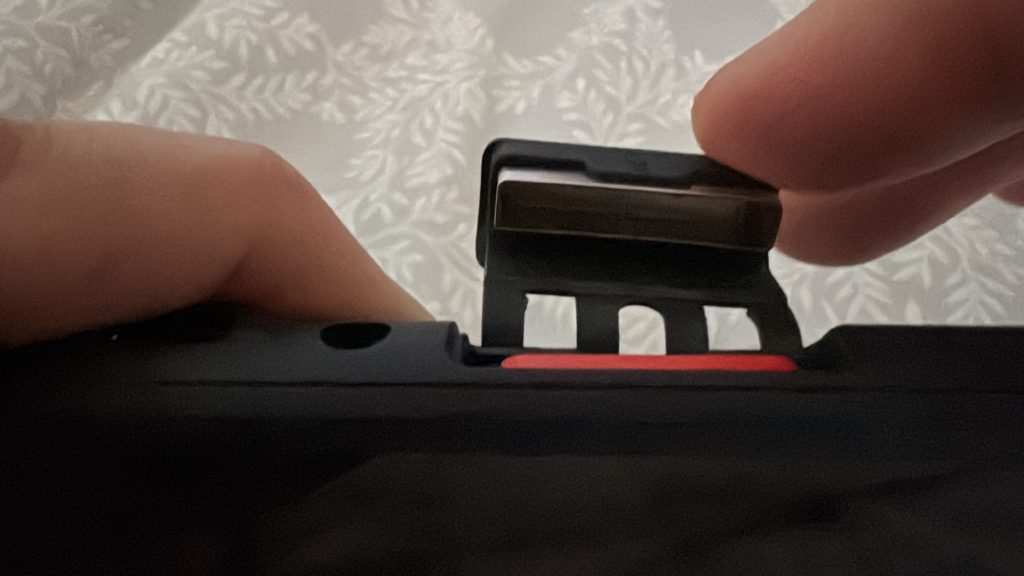
After setting up the Nintendo Switch 2 on the TV, I unboxed my Mario Kart World game and put it into the console. The slot for inserting the game cartridge is designed quite well: It doesn’t exactly make it easy to slip games in and out, but it does have a sturdy metallic cap inside, along with some support arms, which all helps ensure that the game stays in place.
I didn’t expect much, to be honest, but when the game loaded up, I was blown away by how high quality the display was. I’m not going to say it’s better than a PS5, because obviously, it’s not. But, for a Nintendo device, it’s really, really good.

If you want to tweak the experience, you can change the TV display settings between automatic, 720p (HD), 1080p (Full HD), 1440p (WQHD), and 2160 (4K). The Ultra High Speed HDMI Cable, along with the higher frame rate per second and an HDR setting, make all the difference for how this console displays on a TV screen.
If you want the ultimate high quality display experience, this might not be the console for you, but if you want something you can see clearly and don’t care for all the bells and whistles that other high-performance gaming devices have, you’ll be more than satisfied with the TV output of the Nintendo Switch 2.
In Handheld Mode
On the other hand, my first thought when I loaded up Mario Kart World on the handheld device was that it looked a bit disappointing, as I had expected the screen quality to be better. Yes, it’s significantly better than the original Nintendo Switch, but I do wish it had an OLED screen on it (even the last generation Switch has the option to upgrade to an OLED screen!)

Regarding gameplay, the device is great. You get a true experience out of it: It’s designed to be user friendly, intuitive, and easy to play with. You may sometimes get a little confused about the use of buttons, as different games have different controller settings, but if you’re just playing one game at a time, it’s an extremely intuitive device to use. As previously mentioned, the device can feel a little heavy, so prolonged usage of the handheld may not be suitable for long term play for a child, or someone who is facing disabilities.
The Ports, Buttons, and Kickstand on the Nintendo Switch 2
On the Nintendo Switch 2 console itself, you will find:
- The power button.
- Volume controls.
- 2 USB-C ports (one on top and one on the bottom of the console).
- A port to put your games into, with a cover to protect it.
- A headphone jack.
- Ports to plug your Joy-Con 2s into on each side.
- A kickstand.
- Under the kickstand, a place to insert a microSD Express card.
- A microphone.
I have to say, I never really understood the purpose of most kickstands. You place a device on a bed so you can lay down on your stomach and play it? I mean, that’s cool, but I’m not a walrus, so I don’t lay on my stomach that much. The kickstand on the Nintendo Switch 2 makes sense, however: It’s built really well, moves firmly into place for each position, and has real functionality. By extending the kickstand all the way out, you can lay on your back and rest the device on your stomach without causing any real discomfort while playing.

The 2 USB-C ports work well, allowing you to plug your charger in without it being too distracting. The volume controls and the power button work fine, and again, I’m a fan of the port you plug the games into, as it’s comfortingly secure.
System Settings
A few notable settings you will find in the Nintendo Switch 2 are:
- Deeply thoughtful accessibility features, such as text-to-speech and voice type.
- If you only have one user, you can skip the user selection at the beginning of each choice, which was a huge annoyance I had at the beginning but was able to finally resolve.
- The ability to bring your TV resolution up to 2160p (4k).
- An HDR setting that identifies if your TV is capable of HDR, then gives you a better display output (along with the ability to adjust the HDR output).
- Various auto-sleep modes to preserve the device’s life.
- The ability to stop charging around 90% to preserve the battery’s life.
Parental Controls
As a family-friendly system, it’s important for parents to know what they’re able to adjust to make the experience suitable for their kids. The Switch 2 features an app that allows you to maintain your parental controls and monitor your child’s device. In this app, you can:
- Manage the standard parental controls.
- Add restrictions based on a game’s age rating.
- Set play time limits from unrestricted to 15-minute intervals.
- Check your child is following the rules you’ve set.
- Suspend play time.
- Set play time limits for each day of the week (and provide more play time on weekends).
- Provide extra play time for good behavior.
- Get a report on how long your child plays which games.
- Choose who your child can use GameChat with, and how they communicate with others.
Once the rules are established, you can then start gaming together with your child!
Virtual Game Cards on the Nintendo Switch 2

A downside of this era of downloadable games is that you can no longer share games with your friends, the way you used to with physical cartridges. That’s what virtual cards attempt to replicate, allowing you to play a game on up to two different devices (but only on one at a time).
Virtual Game Cards come with games that are downloaded in the Nintendo eShop, such as Yu-Gi Oh! Master Duel, Fall Guys, and Pokemon Unite. In the Virtual Game Card setting, you can load games and lend virtual game cards to members of your family group. You can also lock this screen with a pin, as well and see your virtual games online.
GameShare and How it Works on the Nintendo Switch 2
GameShare on Nintendo Switch 2 is a pretty neat feature: You can loan your friends your games for up to 14 days, and after the expiration date, the game automatically goes back onto your device. This is great for shorter games, especially. It’s also great for trying out a game before you commit to buying it.

Game Cards, Game-Key Cards, and Downloadable Games on the Nintendo Switch 2
Game Cards

If you were to walk into a store and purchase a game made by Nintendo, such as Mario Kart World, it would most likely come on a Game Card. This is when the game is stored on the card itself, which spares the memory of your Nintendo Switch 2. This is probably the best format to purchase a game in, since it doesn’t take a toll on your device’s physical storage limitations.
Game-Key Cards

Sometimes, though, games from third party publishers — such as Street Fighter 6, which is made by Capcom rather than Nintendo — will provide you with a Game-Key Card instead. While you still get a physical cartridge, you have to download the game onto your Nintendo Switch 2 in order to play it, which takes up a lot of unnecessary storage space, just because a company like Capcom doesn’t want to load the actual game onto the cartridge. In addition, it takes four hours to download 48.3 GB of a game, so there’s that extremely long delayed gratification effect as well.
Downloadable Games
Downloadable games are typically found in the Nintendo eShop and can be downloaded directly from the digital store. However, for some reason, retailers are now getting downloadable games as well, where you can purchase what looks like a physical game, but inside, you’ll find only a code that lets you download the game.
Taking Screenshots and Recording Videos
In order to take a screenshot, you tap the dedicated button on the left controller (a circle inside a square). You can take 30-second videos, as well: In order to take a video, you hold down the button on the left controller, and it captures up to 30 seconds of gameplay. In most games, this will capture sound as well, although there are some exceptions, such as Bayonetta 3.
There are some things you cannot take screenshots of, nor screen record. You can’t take screenshots of anything that is said or done in GameChat mode, e.g. (presumably to maintain the privacy of your child, or other party who is playing with you or your child), any areas with sensitive data, and some setup screens.
Screenshots and videos are saved in the device’s Album, a gallery that you can scroll through at your leisure. You can store and watch as many photos and videos as your device will allow storage-wise — if you reach a limit, you’ll have to either start deleting files, or purchase additional storage.
After your screenshots and videos are saved, you can sync your Album to the Nintendo Switch App. From here, you can save your video to your phone and upload it to Instagram, Reddit, or wherever else you want to upload it to, without any problems. It’s pretty phenomenal!
Using the Nintendo Switch App in Tandem with the Nintendo Switch 2
Speaking of the app, there are three key areas on the Nintendo Switch App, which is accessed through your phone:
Home
This screen shows you game-specific services, and provides access to your most recently uploaded screenshots and videos.
Friends
This is where you can see all your Nintendo Switch friends and whether they’re online, when they were last online, and what games they’ve been playing.
Uploaded Data
Here, you can access the last 100 digital media files of screenshots and video recordings you made. These are accessible for up to 28 days and can either be shared through your phone’s share settings, or saved to your mobile device. After 28 days, you can reupload an image or video if you would like by going back into your album and uploading the image or video again.
Nintendo News Section
In the Nintendo News section of your console, you’ll find articles talking about games, what games are on sale, updates, information on previous generation consoles that are available on the Nintendo Switch 2, and more. You will also see titles that are in the news as well, so you can stay updated with all the latest games that are newly released or soon to be released.
Nintendo eShop
In the Nintendo eShop, you can see and get access to featured games; search for a title you’re looking for; have an algorithm build out a “For You” section; create a wish list; access great deals, bestsellers, recent releases, and titles that are coming soon; and enter codes for games you’ve purchased. There are also free games in this section, such as Fortnite and Pokemon Unite.
When you get your Nintendo Switch 2, you’ll also have the ability to go into the eShop to get access to the following systems, depending on your membership level:
Nintendo Switch Online Membership
- NES.
- SNES.
- Game Boy.
Nintendo Switch Online + Expansion Pack Membership
- Sega Genesis.
- Nintendo 64.
- Nintendo 64 Mature 17+.
- Nintendo GameCube.
- Game Boy Advance.
As of the Nintendo Switch 2 release date, these are some of the more notable games that come with each system (more games will probably be added to each of these sections as time progresses):
NES Games
- Super Mario Bros.
- The Original Donkey Kong Jr..
- The Legend of Zelda.
- Kirby’s Adventure.
This is what a NES game looks like on the Nintendo Switch 2:

SNES Games
- Super Mario World.
- Star Fox 2.
- The Legend of Zelda: A Link to the Past.
- Kirby’s Dream Land 3.
This is what a SNES game looks like on the Nintendo Switch 2:

Game Boy Games
- Mega Man III.
- Donkey Kong Land 2.
- Kirby’s Star Stacker.
- Mario Golf.
This is what a Game Boy game looks like on the Nintendo Switch 2:

Sega Genesis Games
- Sonic the Hedgehog 2.
- Earthworm Jim.
- Ristar.
- Gunstar Heroes.
Nintendo 64 Games
- The Legend of Zelda: Orcarina of Time.
- Mario Party 3.
- Pokemon Snap.
- Goldeneye 007.
Nintendo GameCube Games
- The Legend of Zelda: The Windwaker.
- F-Zero GX.
- Soul Calibur II.
Game Boy Advance Games
- Super Mario Advance.
- Warioland 4.
- Metroid Fusion.
- Pokemon Mystery Dungeon Red Rescue Team.
Nintendo Switch Online Usage on the Nintendo Switch 2

If you want to experience the full scope of your Nintendo Switch 2, you should get Nintendo Switch Online. You get a 7-day free trial when you purchase the console, and I would highly implore you to use that time to play Mario Kart World in an online setting. Being able to compete with a total of 24 racers around the world is absolutely amazing, putting your skills into perspective and providing you with a truly unique experience.
One gripe I have with the online version is that the first time I went to join a race, it took around five minutes before I was able to connect to one. The second time and all subsequent times, though, I was able to connect to races quite quickly.
Of note for parents is that the environment is safe for children, because without GameChat enabled (more on that later), your child isn’t exposed to any online chatter: Any text displayed by a user in these settings is contained to a list of preselected choices, like “Hello” or, “Good Game!”
Backwards Compatibility of Original Nintendo Switch Games for the Nintendo Switch 2
Not all games are backwards compatible with the Nintendo Switch 2 — such as Ring Fit Adventure — but most are. Regarding graphical enhancements when playing Switch games on the Switch 2, you’ll find that some games have zero improvements, some have minimal improvements, some have decent improvements, and some are outstanding. In addition, load times for many games will be a lot faster, too.
Some games have their hardware capped at 30 frames per second, which means that there is nothing that can be done to improve the speed or quality of the game. However, others can go from their original 30 frames per second to 60 frames per second, which creates a much more favorable experience.
Here are some videos of three separate Pokemon games and a Zelda game so you can see the differences in quality:
Pokemon Brilliant Diamond and Shining Pearl
In this video, you can see the gameplay and graphics are exactly the same as the original Switch. There are no improvements at all.
Pokemon Sword and Shield
In this video, you will see slight improvements in the graphics, but nothing to call home about.
Zelda: Link’s Awakening
In this video, you will see a noticeable improvement in the graphics. I tested Zelda: Echoes of Wisdom as well, and there were similar improvements to that, too.
Pokemon Scarlet and Violet
In this video, you will see a massive improvement in the graphics compared to playing on the original Nintendo Switch.
In addition to these games being upgradeable, you can also pay to upgrade specific games that have a Nintendo Switch 2 Edition Upgrade Pack, which is around $10 at the time of writing. It includes games like The Legend of Zelda: Breath of the Wild and The Legend of Zelda: Tears of the Kingdom.

GameChat

GameChat is a really neat feature, but a bit of a pain to set up: You have to scan a QR code through your phone, then log into the Nintendo Switch online portal, put in a verification code, then agree to some terms. On the plus side, I guess if you’re a parent and you don’t want your child to use the setting, they make it really difficult for them to access it.
Once GameChat is set up, you can create chats within your current friend list, in which you can do the following:
- Have a conversation with your friend(s) that has clear audio on both sides.
- Share your screen with your friend(s).
- Use text to voice if you don’t want to physically talk, or have a disability that prevents that.
- Use voice to text if you would like to read your conversations as well, or have a disability that prevents you from hearing.
It’s a pretty neat feature and brings a new dynamic to the Nintendo Switch 2 system. Some parents may be fearful of allowing their child to use a GameChat feature on a device, but it’s generally safe, since your child would need to have approved friend requests prior to being able to speak to anyone on the system. In addition, screenshots and video recordings are unusable when this setting is active, protecting your conversations from going beyond a particular gaming session.
This really just comes down to budget: $449 for just a console, or even $499 for a console that comes with one game, is expensive. The original Nintendo Switch is currently $299 and the Nintendo Switch Lite is $199. Will your child appreciate a Nintendo Switch 2? Absolutely. Is it practical for your family’s financial situation? That’s up to you.
-
- It’s a lot bigger.
-
- The screen has higher quality than the original Switch, but the Nintendo Switch with the OLED screen is still the best so far.
-
- The controllers are bigger.
-
- It has a microphone.
-
- It has a better kickstand.
-
- There are two USB-C charging ports instead of one.
-
- The display is much better on a TV.
For me personally? No. The original Nintendo Switch I’ve owned for five years has over 400 GB of data stored between the MicroSD and the device itself. From just my testing period, I’ve only got 187 GB left out of the 256 GB the Nintendo Switch 2 came with. While Nintendo has a 256 GB microSD Express card for sale, I feel that isn’t going to be enough, either. If you plan to use the Nintendo Switch 2 thoroughly for years to come, due to the increased file size of games, in addition to some games being Game-Key cards that require the game to live on your device, the Nintendo Switch 2 should have a 1 TB microSD Express card in it.
-
- A second Joy-Con 2 controller would be necessary in order to play games with friends and family at home.
-
- While at the time of writing this, Nintendo doesn’t have an official charger for four Joy-Con 2s at once, I feel they will release one of those as well, which would be a necessity for any Nintendo Switch 2 owner.
-
- A carrying case would definitely be something that a traveler or a child would need to protect their Nintendo Switch 2. However, I don’t feel that this one needs to be contained to the Nintendo OEM ecosystem. I would probably purchase a carrying case that comes with storage slots for your games, though.
-
- Some players like the look and feel of the Nintendo Switch 2 Pro Controller, so that could be an option.
While I was able to get my Nintendo Switch 2 console on release day at GameStop, the Nintendo Switch 2 console is also available at Target, Best Buy, Walmart, Nintendo, and Costco.
In My Expert Opinion
Is the Nintendo Switch 2 worth getting? Absolutely, if you have the budget for it, are a casual gamer, want to play a console with friends, love Nintendo, or have children who would enjoy it. If you’re a more hardcore gamer who loves PS5 and X-Box and are obsessed with graphics, this console may not be for you. But for everyone else, it’s a blast.
