

I’d been considering a robot vacuum for a while — specifically, ever since I got two cats, earlier this year — so when offered the chance to test out the Eufy Omni E25, I said yes immediately. I wasn’t super optimistic that it would suit my needs (or rather, the needs of my floor, which is now frequently coated in a layer of cat fur and tracked litter), but it turns out I was wrong: This little guy is the best.

Eufy Omni E25
Specifications
- Dimensions: 13.7 inches deep x 12.8 inches wide x 4.4 inches high (vacuum), 18.2 inches deep x 14.5 inches wide x 17.2 inches high (base station).
- Input voltage: 100-127 V, 50-60 Hz.
- Suction power: 20,000 Pa.
- Run time: 125 minutes (vacuum and mop), 216 minutes (vacuum only).
- Dust collection capacity: Three liters.
- Obstacle avoidance: RGB camera and LED.
- Navigation type: LiDAR.
- Returns: Can be returned within 30 days.
- Price: $1,299.99.
Pros
- Self-emptying, self-washing, and self-drying.
- Navigates extremely well.
- Relatively quiet.
- Fast set-up.
- Easy to schedule or use at will.
- Allows up to five maps per base station.
Cons
- Setting up multiple maps takes some trial and error.
- Obstacle clearance height of only 0.83 inches.
- Surface of vacuum gets dusty pretty quickly.
The Unboxing


The Eufy Omni E25 arrived boxed, inside an even larger cardboard box. Inside was:
- Robot vacuum.
- Omni station (dock/base station).
- One floor cleaning solution cartridge.
- Detachable base.
- Safety sheet.
- Quick start guide.
- Power cord.
The Design

The exterior design is pretty much what you’d expect from a robot vacuum — a sort of rounded square shape for the vacuum itself, with a tall base station that allows it to dock, charge, wash its mop, and other handy functions. The model I received was all black, with the vacuum and base comprised of both matte and shiny, translucent sections. It’s unobtrusive, functional, and sleek enough to pass muster in a modern household.

In terms of its functionality, the Omni E25 boasts 20,000 Pa (Pascals, the unit used to measure suction power), which is high for a robot vacuum — the average is closer to 5,000. It also features brushes designed to prevent hair tangles, and CornerRover Arms for thorough edge cleaning.
The Set-Up

Setting up the base station was a quick and simple process, requiring little more than snapping a few pieces together, filling the water reservoir, and plugging it in. Then, it was onto the app set-up and mapping.
Having spent some time testing out the Eufy E15 robot lawn mower, I was expecting a similarly protracted (if straightforward) set-up experience. I was shocked, then, that it completed its LiDAR mapping of my house — with no assistance from me — in a matter of minutes, trundling around the place a few times before the app let me know it was done, displaying a pretty accurate map of my first floor. From that point, all I had to do was press “Start” in the app, and off it went.
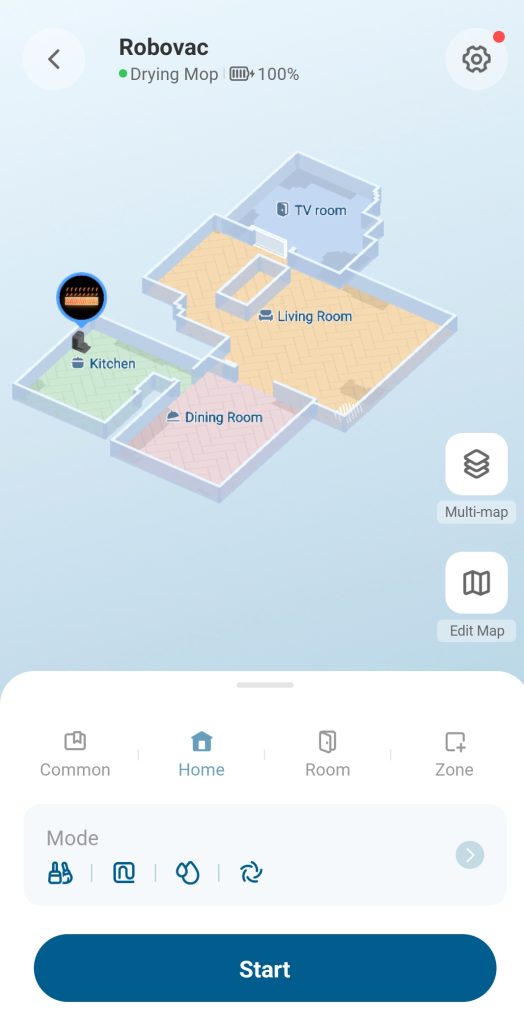
The Omni E25 can manage multiple maps — five, in fact — from one base station. This is great news for me, since our carpeted family room is down a single small step (it’s only a couple of inches, but the vacuum can’t navigate obstacles over 0.83 inches high), which necessitates a second map. After setting up the first map to cover all the hardwood floors, I noticed that the vacuum would inevitably tumble down this step and get stuck. This was fixed easily enough by adding a virtual boundary in the map editing function: No more tumbles!

Setting up a second map for this room was trickier. I couldn’t carry the vacuum in there and let it start mapping — I had to let it find its way there, then help it down the step, and let it go from there. It’s the same when I want that room vacuumed (important side note, you can choose between vacuuming and mopping, or just vacuuming, for specific areas of your map) — I tell it to vacuum the family room, let it make its way to the step, then help it down before it falls. Once there, it confirms its position and happily starts vacuuming. When it’s done, I lift it over the step, and it finds its way back to the dock.

In practice, what this means is that, while the Omni E25 can vacuum and mop most of the first floor by itself (which it does, every day, at 10am), the family room requires a human presence, so that room is only vacuumed when I specifically order it. In theory, this could be solved with the addition of a small ramp — again, it knows when to mop and when to just vacuum, so the carpet would be perfectly safe — but it doesn’t seem necessary at the moment.
The Experience

If I’m being completely honest, I’m not a huge gadget enthusiast. I’m not someone who enjoys learning every last application, or figuring out hacks to make things work properly: I just want gizmos to work, properly, first time out of the box. As such, I am often disappointed.
Not this time! Within a half hour of opening the box, I had the Omni E25 set up, the floor mapped, and the schedule set. The family room aside, I haven’t had to do a thing since. At 10am every day, the Omni E25 cleans its mop, rolls out of its dock, patiently endures a merciless battering from my cats (who are obsessed with and terrified by it in equal measure), and gets to work. It takes between 45 minutes and an hour to vacuum and mop the kitchen, dining room, and living room, then rolls back to its base to re-wash and dry its mop.

Using it ad hoc is similarly easy: After preparing a large meal for friends last week, I had the vacuum do a quick clean and mop of the kitchen floor before my guests arrived, which is not something I would have bothered with had it not been so effortless.
The Maintenance


The Omni E25 mostly takes care of itself. If it runs out of power during a clean (which, I should note, it has not done so far), it will simply roll back to its base, recharge, and then continue cleaning. It washes and dries its own mop, refills its water and cleaning solution tanks, and empties its waste receptacle. The most notable bit of maintenance is not with the vacuum itself, but with the floor: The Omni E25 is great at navigating around stuff, but the less junk you have on your floor, the better job it will do of cleaning. Oh, also: It does not like cat wands. I have twice found it trying to ingest a 24-inch wire cat wand, and have since banned them from being left on the floor.
The base station itself requires some occasional maintenance: The manual recommends emptying the dustbin weekly, and the water reservoir monthly (one word of warning: In my experience of emptying the waste water, it absolutely reeks, so hold your breath). As the price paid for a daily cleaning, it’s a pretty minor one.
Eufy Omni E25
The End Result
This one is a massive win, for me. The set-up is easy, the maintenance is minor, and the result — a clean floor, every day — is clearly visible. The Eufy Omni E25 does exactly what you’d want a robot vacuum to do, and it does it as unobtrusively as you could reasonably ask. My kids immediately nicknamed it “Bestie,” and this time, I’m in absolute agreement.
