

Not all Apple AirPods models are alike. The AirPods 4 ($179) offer active noise cancellation, but lack many features you get with the advanced AirPods Pro 3 ($249) earbuds which were released in mid-September 2025. This third generation of the AirPods Pro earbuds provide enhanced active noise cancellation (ANC) — a feature that removes ambient noise, allowing you to experience just the audio you want to hear without compromising its quality or clarity.
And then there’s the AirPods Pro 3’s superior spatial audio with head tracking capabilities. Instead of generating two channel stereo sound, these earbuds can simulate the experience of having speakers all around your head. This creates a far more immersive listening experience that adapts as you move your head.
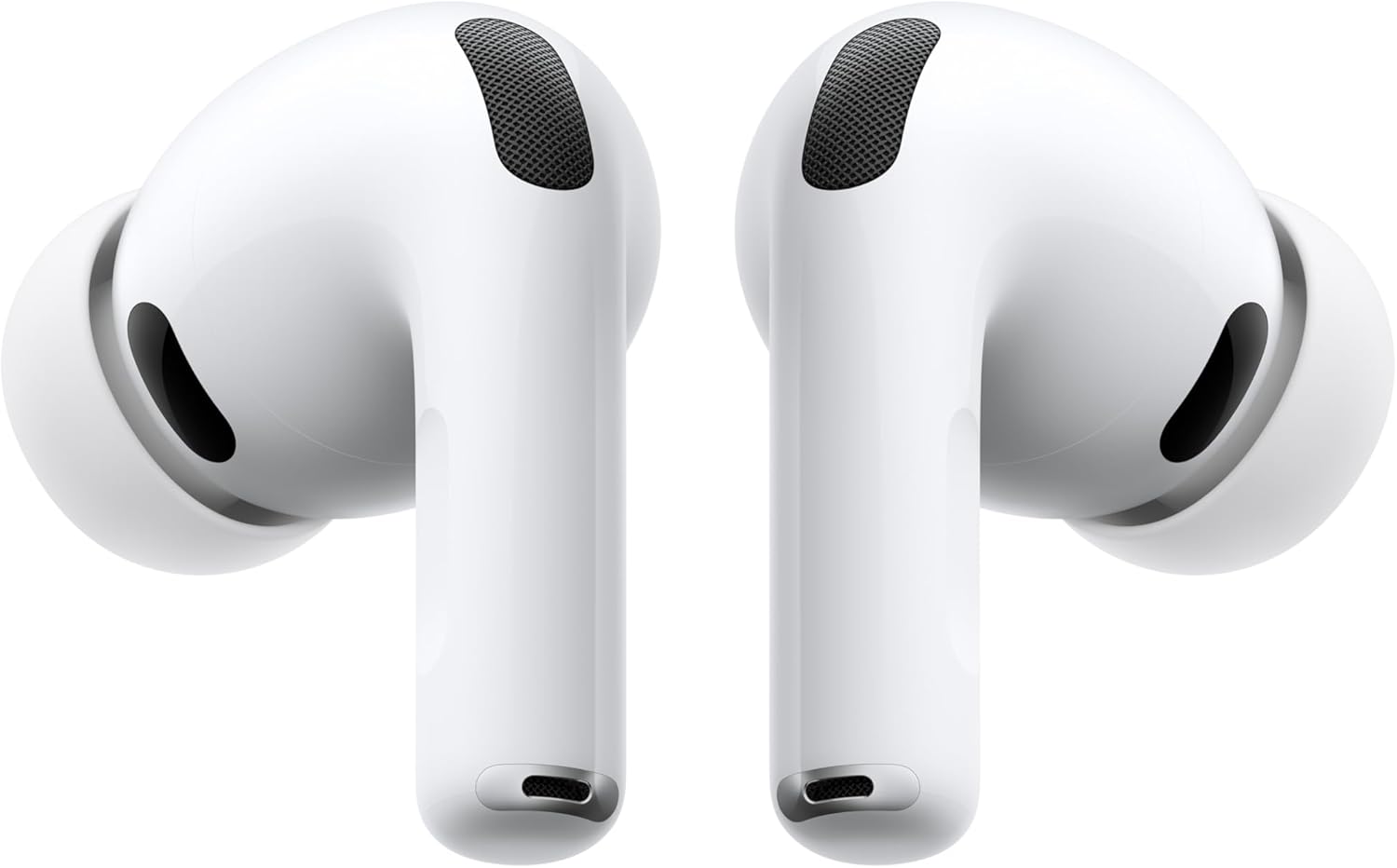
Apple AirPods Pro 3 Wireless Earbuds
As a result, if you’re listening to a stream or recording of a live concert, it sounds as if you’re in the middle of the theater or concert hall. Or if you’re watching a movie with an action sequence, the audio from the AirPods Pro 3 makes it feel like the action is happening all around you.
Improved active noise cancellation and spatial audio with dynamic head tracking are two of the multiple features Apple has improved upon. Other features and technologies have also been introduced into these earbuds for the first time. On the day these new earbuds were released, I purchased a pair for myself. At the time, I took advantage of Apple’s free monogram service to have my initials (JRR) added to the earbuds’ wireless charging case.
Having used all previous versions of the AirPods and AirPods Pro earbuds (including the Apple AirPods Pro 2s), I was anxious to see how well these latest earbuds performed in my everyday life. Designed for Apple device users, AirPods are a line of Bluetooth (wireless) earbuds that are comfortable to wear for extended periods. They’re designed to provide a robust listening experience when enjoying music, audio from TV shows or movies, podcasts, hands-free phone calls, or while participating in video calls.
All of the AirPods models share a handful of features that only work with other Apple devices, such as the ability to automatically pair with whichever Apple device you’re using (iPhone, iPad, Apple Watch, iMac, or MacBook). Yes, I continue to be a huge fan of other higher-end earbuds from Bose, Bowers & Wilkins, and other premium brands. However, these other earbuds lack the exclusive features that AirPods offer to Apple device users.
Furthermore, for people with mild to moderate hearing loss, the AirPods Pro 3 can serve as FDA approved over-the-counter hearing aids — a feature not offered by other earbuds. As hearing aids, these earbuds are easy to use, offer tremendous control over the listening experience, and are extremely affordable compared to traditional hearing aids that offer similar functionality.
Keep reading to learn more about Apple’s flagship wireless earbuds, and discover why I highly recommend them to all Apple device users.
Specifications
- Price: $249.
- Chip: Apple H2.
- Wireless Charging Case: Yes (MagSafe compatible).
- Earbud Drivers: 10.7 millimeters.
- Bluetooth: Version 5.3.
- Battery Life: Up to 8 hours (Up to 30 hours using the case).
- Port: USB Type-C.
- Water Resistance: IP57.
- Earbud Dimensions: 1.22 inches high by 0.76 inches wide by 1.06 inches deep.
- Earbud Weight: 0.20 ounces.
- Charging Case Dimensions: 1.86 inches high by 2.45 inches wide by 0.86 inches deep.
- Charging Case Weight: 1.55 ounces.
- Microphones: Dual beam forming and one inward-facing mic per earbud.
- Automatic Device Switching (Multiport Connectivity): Yes (Between Apple devices).
- Over-the-Counter Hearing Aid Capabilities: Yes.
Pros
- Longer battery life than previous model.
- 2x better ANC compared to AirPods Pro 2.
- Heart rate sensor feature (during workouts).
- Updated earbud and case design.
- Live language translations.
- Works as FDA certified OTC hearing aids.
Cons
- Charging case offers wireless charging, but no USB Type-C charging cable is included.
- Charging case is slightly larger, but lighter than the AirPods Pro 2 charging case.
- Earbuds and the charging case are still only available in solid white.
Who Will the AirPods Pro 3 Earbuds Appeal To?
While the AirPods Pro 3 can be paired with any Bluetooth compatible audio-generating device (such as a smartphone, tablet, smartwatch, computer, or smart TV), Apple’s flagship earbuds are designed primarily for Apple device users. So, if you already use an iPhone, iPad, Apple Watch, MacBook, or iMac, not only will the AirPods Pro 3 allow you to enjoy high quality audio, but you can also take advantage of Apple-specific features. These include the ability of the AirPods to automatically pair with whichever Apple device you’re using, and then switch between devices as you do. Plus, if you misplace an AirPod earbud or the charging case, you can track their location using Apple’s Find My service.

Out of all the Apple AirPods models available, the AirPods Pro 3 are the most feature-packed and technologically advanced. As a result, they can deliver better quality audio, while offering features like active noise cancellation, spatial audio with dynamic head tracking, personalized spatial audio, and more. In a nutshell, if you’re already an Apple device user looking to hear the highest quality audio possible — and experience the clearest hands-free phone calls or video calls possible — the AirPods Pro 3 are the earbuds you want.
These earbuds sound fantastic when listening to music, streaming audio while watching movies or TV shows, enjoying podcasts, participating in hands-free phone calls and video calls, engaging in an in-person conversation with people who do not speak your language, and so much more.
Plus, if you’re experiencing mild to moderate hearing loss, the AirPods Pro 3 can be used as FDA certified over-the-counter hearing aids. The iPhone has an interactive hearing test feature that automatically calibrates the AirPods 3 earbuds to your level of hearing loss. For an Apple user who needs hearing aids, the AirPods Pro 3 earbuds provide more features at a lower price than most OTC hearing aids from competitors.
Apple AirPods Pro 2 Versus AirPods Pro 3
Unlike iPhones, iPads, and Apple Watches, Apple does not release a new version of the AirPods Pro every year. It was September 2022 when the AirPods Pro 2 were released, yet these continue to be wildly popular among Apple users. While the AirPods Pro 2 and AirPods Pro 3 look rather similar from the outside — in terms of the appearance, size, and weight of the earbuds themselves (and their wireless charging case), Apple has packed a handful of new or enhanced features into the AirPods Pro 3 which make them a worthwhile investment for many Apple device users.

For the AirPods Pro 3 earbuds, Apple boasts two times better active noise cancellation than the AirPods Pro 2 (a feature which already worked extremely well compared to competitors). Especially when using the AirPods in an extremely noise environment, like on a train or airplane, or while walking down the streets of a load city, the ANC feature now integrated into the AirPods Pro 3 earbuds does a remarkable job at getting rid of the unwanted ambient noise and allowing the user to focus on the audio they want to hear without distortion or quality loss.
I found that the enhanced ANC built into the AirPods Pro 3 is somewhat noticeable, but I was already very pleased with the ANC built into the AirPods Pro 2. When used in a variety of noisy settings, my ears could not hear a dramatic improvement to this already impressive feature. The quality of an earbud’s ANC is a key feature that contributes to someone’s listening experience and helps to enhance the quality of hands-free calls. And whether you’re using the AirPods Pro 2 or AirPods Pro 3, the integrated ANC is extremely impressive.
The spatial audio with dynamic head tracking is also a feature I loved when using my AirPods Pro 2, and it works just as well with the AirPods Pro 3. This is most noticeable when listening to music, podcasts, or audio from TV shows or movies that was produced to accommodate and make full use of this immersive feature.
For me, one key feature I love about the AirPods Pro 3 is the increased battery life of the earbuds themselves, and how much extra listening time you can get using the wireless charging case when no external power source is available. On a full charge, you can expect up to eight hours of listening time from the earbuds (with ANC turned on). With extra charges using the charging case, listening time can be extended up to 30 hours.
And if you’re someone who uses your AirPods during workouts or while outdoors, Apple has improved the waterproof rating of the AirPods Pro 3 from IP54 to IP57. Meanwhile, one of the features I rely on the most when using AirPods is their ability to generate clear audio when I participate in hands-free phone calls, or while engaged in video calls or virtual meetings. The three microphones built into each earbud now use better voice isolation technology to capture higher quality voice audio, while helping the ANC feature perform at its absolute best.

I also discovered the AirPods Pro 3 earbuds do an excellent job in Transparency and Conversation Awareness mode. Instead of cancelling out and removing all ambient audio, if you want to hold an in-person conversation with someone in close proximity, or maintain situational awareness when wearing the earbuds, you can continue to hear the external audio that’s important, while unwanted noise continues to be removed. This means you can hold an in-person conversation with someone without removing your earbuds.
Since the first generation of AirPods Pro earbuds was released, the processor built into the earbuds has always managed the listener’s adaptive EQ when listening to audio. In other words, you can’t personalize the EQ yourself. But, this AI-driven feature continues to handle this task remarkably well. This is also primarily the case with the personalized spatial audio and dynamic head tracking features. With the earbuds managing these tasks for you, there’s less manual tinkering involved when trying to enjoy different types of audio.
New to the AirPods Pro 3 is a heart rate sensor that kicks in while you’re working out. Data is collected by the earbuds and wirelessly transferred to the iPhone’s Fitness app when participating in more than 50 types of workouts or fitness activities. This feature works whether or not you’re an Apple Fitness+ subscriber.
And in keeping with providing AI-driven tools designed to make communication easier, the AirPods Pro 3 can handle real-time language translation. While you’re wearing the AirPods, if someone speaks to you in a foreign language, the AirPods can translate what’s being said and use Siri’s voice to provide audio translations that you hear through the earbuds. When both people are wearing AirPods Pro 2s or AirPods Pro 3, a near seamless conversation with people speaking two different languages is now possible.
Finally, the AirPods earbuds themselves, as well as their charging case, are rather small. This makes them easy to accidentally misplace. Thanks to Apple’s Find My tool, you can track the location of your AirPods from an iPhone, iPad, MacBook, iMac, or any device with a web browser.
At-A-Glance Key Feature Comparison
This table summarizes key similarities and differences between the AirPods Pro 2 and AirPods Pro 3 earbuds.
| Feature | AirPods Pro 3 (2025) | AirPods Pro 2 (2022) |
| Heart Rate Sensor | Yes | No |
| Battery Life | Up to 8 hours | Up to 6 hours |
| Battery Life with Charging Case | Up to 30 hours | Up to 24 hours |
| Waterproof Rating | IP57 | IP54 |
| Silicon Earbud Tip Sizes | XXS, XS, S, M, L | XS, S, M, L |
| Earbud Dimensions & Weight | 1.22” x 0.76” x 1.06” (0.20 ounces) | 1.22” x 0.86” x 0.94” (0.19 ounces) |
| Charging Case Dimensions & Weight | 1.86” x 2.45” x 0.86”(1.55 ounces) | 1.78” x 2.39” x 0.85” (1.79 ounces) |
| Live Language Translation | Yes | Yes |
| Adaptive Audio | Yes | Yes |
| Active Noise Cancellation | 2x better than AirPods Pro 2 | Yes |
| Transparency Mode | Yes | Yes |
| Conversation Mode | Yes | Yes |
| Personalized Spatial Audio | Yes | Yes |
| Works with “Find My” | Yes | Yes |
| Auto Pairing with Apple Devices | Yes | Yes |
| Price | $249 (on Amazon) | $199 (on Amazon) |
Unpacking and Using the Apple AirPods Pro 3
One of the best things about using Apple AirPods is that right out of the box (once you charge their battery), setup and pairing takes just seconds with an iPhone. This is now a fully automated process. Apple has removed the pairing button from the charging case. It’s no longer needed. Simply open the lid of the AirPods charging case when it’s in close proximity to your iPhone, and the connection will be established. Once this initial pairing is complete, anytime you place the AirPods in your ears, they automatically connect to your iPhone, iPad, Apple Watch, MacBook, iMac, or Apple TV device. Plus, if you switch between devices, the AirPods determine which device you’re using and connect to it.

Unlike other popular earbuds, the AirPods do not have their own app for controlling the listening experience. Instead, controls are baked directly into the iOS, iPadOS, AppleTV OS, and MacOS operating systems. To switch between listening modes or control various features of the AirPods, this is done by accessing the Audio menu on the Apple device you’re using.

Each AirPods earbud also has a touch control sensor built into the stem. Depending on how you tap or press an earbud’s sensor, you can handle a wide range of tasks, like volume control, or answering/disconnecting from a phone call. When it comes to listening to audio, the play, pause, fast forward, rewind, track forward, or track backwards functions also have a unique tap or press sequence. You can also turn on or off the Transparency mode and Conversation Awareness modes, among other things using these onboard sensors.

As with all versions of the AirPods that have these touch sensors on their stems, it’s necessary to memorize the tap or press combinations required to control each feature. Plus, different touches or pause combinations work differently when you’re engaged in a hands-free call versus when just listening to audio. Memorizing the various ways to use these sensors can be confusing at first, and it takes some practice to use them, since these functions are not intuitive. Also, from the AirPods submenu within Settings, you can customize some of these touch sensor command options.

The AirPods Pro 3 Earbuds Work As Affordable Over-The-Counter (OTC) Hearing Aids
In October 2022, the FDA began allowing for over-the-counter hearing aids to be sold in the United States. Initially, while offerings from Bose, Sony, Jabra, and other brands looked like standard wireless earbuds, these OTC hearing aids were more expensive and relied on more advanced technology that traditional earbuds.
Meanwhile, working closely with the FDA, in September 2024, Apple received approval for the AirPods Pro 2 and now AirPods Pro 3 earbuds to be sold and used as OTC hearing aids. Before someone can turn on this functionality, it’s necessary to participate in a multi-step hearing test using their iPhone. If this test reveals the user could benefit from OTC hearing aids, they can then turn on and fine-tune this functionality from within Settings on their iPhone. At no point is it necessary to consult with an audiologist, but doing so is highly recommended.
The iPhone screenshot sequence shown below depicts the main steps involved with the hearing test and activating the OTC hearing aid functionality when using the AirPods Pro 3.

To access the hearing test feature that’s now part of the iOS operating system for iPhones, place the earbuds in your ears (after they’ve been paired with your iPhone) and launch Settings. Next, tap on the AirPods Pro 3 option. From the AirPods Pro 3 sub-menu, tap on the Take a Hearing Test option and follow the on-screen prompts.
The actual test is rather simple. After answering a few questions, the iPhone generates a series of tones at different volumes and frequencies – first in your left ear, and then your right ear. Whenever you hear a tone, tap anywhere on the iPhone’s screen. Once both ears have been tested, the results are displayed. If the results indicate you could benefit from turning on the AirPod Pro’s hearing aid functionality, tap on the Set Up Hearing Aid option located below the Done button on the iPhone’s screen.
While working as OTC hearing aids, you can use your iPhone to fine-tune what you hear and what’s picked up and played by the AirPods Pro 3 using a series of menu options. For example, you can adjust the microphone sensitivity and level of noise cancellation, clarify speech, and handle other tasks in real-time.
This means you can use these earbuds to hear better during in-person conversations (as voices will sound clearer and at the volume you choose). This also works when participating in hands-free calls using your iPhone, while you’re watching TV at home, watching a movie in a theater, dining in a noisy restaurant, attending a party, or speaking with people outside in a noisy environment.
Not only are the AirPods Pro 3 earbuds as capable as any other OTC hearing aids and many traditional hearing aids provided by audiologists, this option is available at a fraction of the price. As a result, hearing aids are now more affordable than ever. While I am not personally impacted by hearing loss, I have participated in the hearing test and experimented with the hearing aid functionality offered. I found they work extremely well.
Someone who is not tech savvy could benefit by having someone who is help them participate in the hearing test and set up the hearing aid functions of the AirPods Pro 3 using the iPhone. Once this process is completed, using the earbuds as hearing aids becomes a straightforward process. Again, I suggest consulting with an audiologist if you find hearing aids are necessary for yourself or a loved one.
My Final Thoughts: Are the Apple AirPods Pro 3 Earbuds Worth It?
For the average person, hearing the differences in audio quality between the AirPods Pro 2 and AirPods Pro 3 when listening to audio or participating in hands-free phone calls will likely be negligible. If you already use the AirPods Pro 2, unless you plan to use the new features that are exclusive to the AirPods Pro 3, the upgrade may not be a necessity for you.
However, for someone who has never used AirPods, or will be upgrading from any generation of AirPods or the AirPods Pro 1, when you insert the AirPods Pro 3 into your ears, you can expect a dramatic improvement to your overall listening experiences. If you fall into this category of users, the investment in the AirPods Pro 3 is definitely worthwhile.

The AirPods Pro 3 offer higher-end and more advanced audio technology than what’s ever been integrated into any AirPod model. And in many ways, these earbuds are superior to many of the earbuds offered by competitors. If you plan to use these earbuds as over-the-counter hearing aids, the AirPods Pro 3 are definitely the model you want.
Apple AirPods Pro 3 Wireless Earbuds
The upgrade is also worthwhile if you want to experience the longer battery life offered by the AirPods Pro 3. Ultimately, these earbuds offer enough compelling reasons for most Apple device users to upgrade to the AirPods Pro 3. From a price standpoint ($249), the features you get are equivalent to or better than what’s offered by competitors with earbuds sold at a similar price.
