

After all of the technological milestones televisions have made since the adoption of flat screen TVs, using a TV as a piece of art felt like a step backwards. Of course, I was wrong. The ability of doubling a TV as a monitor to display your choice of art is a terrific idea. It eliminates the “black mirror” in the room and creates a different atmosphere to your living room whenever you don’t want to stream and binge.
The biggest player in the “TV as art” field is easily the Samsung Frame. Created in 2017 by Yves Behar and Samsung, the Frame became the new trend in turning tech into something more than just a screen to watch things. You could now look at things on it. And now, eight years since its debut, frame TVs are still popular, with the 75 inch model Samsung Frame currently selling for $2500.
The TCL NXTVISION TV is without a doubt a TV cashing on the trend. It’s a budget alternative to the Samsung Frame: a flat, matte screen that can double as an ever-changing piece of art. But is it also a good TV? Can a TV serve as a piece of art? Before that question was answered, I wanted to know, can a TV that’s meant to display art just be a good TV? Can it be both?
I have been using the TCL NXTVISION for about 3 months and it’s been surprisingly disappointing.

Pros
- No screen glare.
- Comes with a wall flush mount.
- Simple navigation.
- Robust art gallery.
- Neat controller.
Cons
- Backlight issues.
- Mounting is difficult.
- No speakers (may be an issue for some).
- No auto screensaver.
- Surprisingly heavy.
- Port accessibility.
Specifications
- Size: 75 inches.
- Weight: 68.34 lbs.
- Resolution: 3,840 x 2,160.
- Outputs: HDMI (4 in total), USB, RF.
- Price: ~$1,699.99.

TCL NXTVISION
Mounting / Set up
Setting up the TCL NXTVISION was an absolute pain in the ass. In my experience, mounting a TV was fairly easy in the sense that one giant frame screws into your TV, while you screw another giant metal frame to your wall. Those two pieces click into each other, and boom, the TV is mounted. I’m over simplifying the experience, but still, it’s a straightforward method.
The TCL TV has, instead, two smaller mounting brackets on the back of the TV that need to perfectly align with two separate wall pieces. Thankfully TCL gives you a stencil to line up the brackets, but the margin for error is too wide for my taste. The TV also has grooves at the bottom of the TV where you can push in and align your cables as the TV will sit nearly flush to the wall meaning you will have no space for anything behind it. That’s cool since the TV is meant to appear like framed art, so you should go into purchasing this TV with a plan on how to hide your wires. Unless of course, you don’t care about wires.
Alternatively, the Samsung Frame offers buyers the One Connect Box, a box that works as a single connection to the TV, providing access to various ports but it also hides all of your cables and wires. TCL does not offer anything similar to the One Connect Box, so plan ahead for your cables if you don’t want them to be seen.
After I was done getting all of the mounting pieces in order, I was surprised to find that the TV was heavier than expected. At 69 lbs., it took me and two friends to mount it.
Art Mode
Once the NXTVISION was ready to go, the first thing I launched into was Art Mode. The TV has 350+ pieces of free art built into the TV’s software. It’s easy to access, easy to scroll through, and there are some surprises. For example, there is a category for AI art, which I have no intention of ever using. There’s also an option to select the artwork to move. Think of it as a GIF or when an album cover comes to life in Apple Music. It’s subtle, but I wasn’t a fan. I just wanted to stare at Van Gogh art and other classics.

The NXTVISION lets you choose from museums or by artist, and there is a great deal of variety to choose from. However, this is where the NXTVISION fails. In order for you to have the art up, you have to select it via the button on the remote. The placement of the button is great: it’s in the top corner across from the power button. However, the TV has no setting to automatically turn on the art like a screensaver would on a computer. It’s a manual push of the button every single time you want art.
For example, if you pause a Netflix series for 10 minutes, the TV won’t automatically pop into Art Mode. My Roku streaming stick will automatically jump on a screensaver with ease. The NXTVISION makes me make that choice, every time. And that feels like a huge loss. According to this helpful YouTube video, there is a way to turn on Art Mode and keep it on until you want to watch TV, but it shouldn’t be this complicated.
There’s also another option of uploading your own art via a flash drive, but once the TV was mounted, I had no desire to plug anything into the TV and unmount it.
Picture Quality
The NXTVISION has Google TV built in, so it did not take long to download my preferred apps and get streaming. The picture quality is great, but there’s one big problem I had: edge lighting.
Everything I viewed on the screen looked great or just okay. I streamed Netflix to watch Breaking Bad, and the image quality was stellar. Colors popped. Faces were crystal clear. Everything was terrific. Even watching Sonic the Hedgehog on Netflix looked bright, colorful, and impressive.
When I plugged in my Xbox Series X and watched a 4K blu-ray and a standard blu-ray, the picture quality was much more impressive. Reservoir Dogs on 4K looked as if it was filmed yesterday with stunning quality and crisp detail. I’m a firm supporter of physical media, so I wasn’t surprised that the movies looked amazing on disc. Even a new printing of Conan The Barbarian on blu-ray (2K) by Arrow Video looked excellent. Video games from my Xbox, specifically Robocop: Rogue City looked fantastic. My friends, who are not gamers at all, were incredibly impressed with the likeness of Peter Weller in 4K video game clarity.
The only pain point where the NXTVISION lacked in picture quality was in using Airplay. As a test, I streamed Andor on Disney Plus from my iPhone to the TV, and the color quality was noticeably flat. Even Doctor Who, a more colorful show, visually speaking, looked incredibly dull. I think there’s just a dip in data reading when throwing an image from my phone to the TV over bluetooth and that’s expected.


The biggest issue was the NXTVISION’s use of edge lit technology, meaning light is coming from the top and bottom edges or the entire perimeter of the TV and pumping towards the center to give you a picture. And the tech is painfully obvious when scenes fade to black. During those brief moments, the black on the screen looks like a ghost is living in my TV. Those moments have made me notice that the blacks on the TV are not that black. It’s a bummer. This is not an exclusive issue for the NXTVISION. Edge lighting TVs are abundant, and they’re generally disliked by hardcore TV enthusiasts, and they’d be quick to tell you to avoid this tech style. I would agree.
Audio
This may come as a surprise to some, but the NXTVISION has no audio speakers. Flat screen TVs have infamously been horrible at projecting sound, so it’s probably for the best. There are exceptions to the rule, notably the Panasonic Z95 Series TV, but if you’re someone who doesn’t own a sound bar, or some type of external speakers, be warned that the TV will permanently be on mute.
Instead of speakers, the NXTVISION has an optical audio output, or you can consider the TCL NXTVISION PRO, which comes with a wireless subwoofer and soundbar by Bang & Olufsen for $3,499, but all sizes with the audio combo are all “coming soon” on TCL’s website.
Frame
Attached to the entire edge of the TV are multiple magnetized panels that compose the frame aesthetic to the TV. It’s pretty neat. The default option with the NXTVISION is an off white/beige color. And unfortunately TCL does not offer any other option to purchase. Samsung however does, and there are a few third party options that will make your TV look like a real work of art. But it’s another let down that TCL didn’t cash in on the magnet frame.

Remote Control
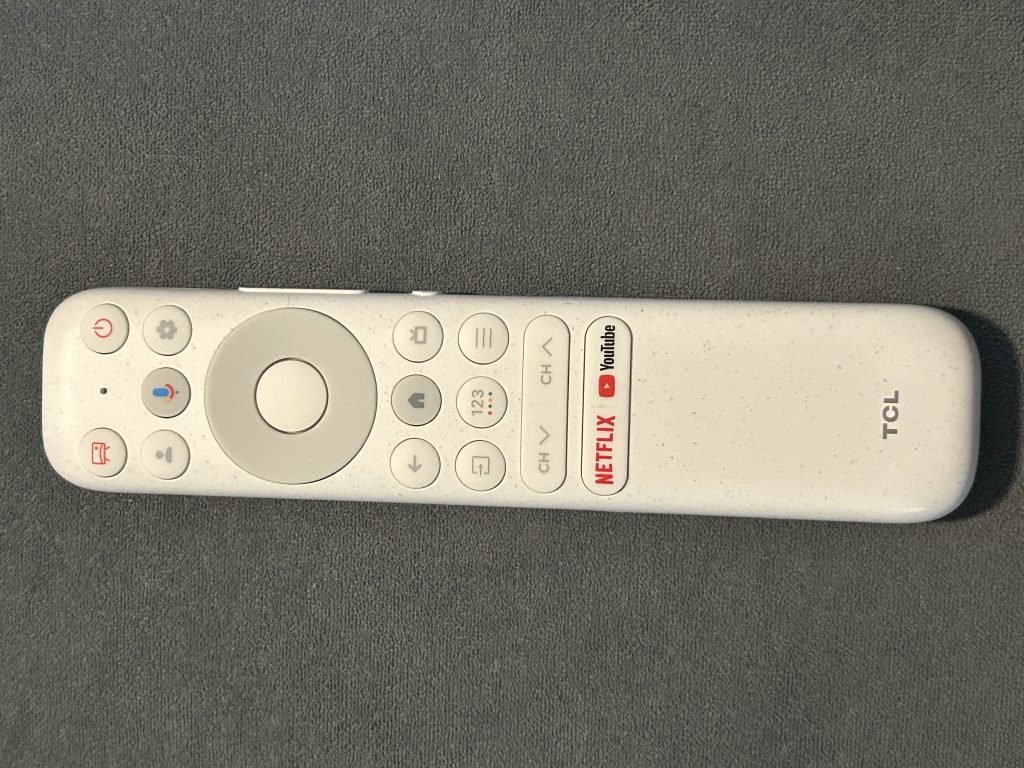
The last unique feature of the NXTVISION is the remote. It’s a no frills, white remote that feels like it was purposely made white to give the TV a fancier feel. Honestly, I lose my remotes in my living room constantly because my couches are dark, so a white remote feels like an upgrade. Still, the remote is simple, slim, clean and to the point. It reminds me how complex remotes were when I was a child, and how far we’ve come.
TCL NXTVISION
Is the TCL NXTVISION for You?
If you want the Samsung Frame and you don’t want to spend the money, then don’t settle for the TCL NXTVISION. Outside of the nitpicks like mounting, weight, the picture quality, specifically the edge lighting makes this TV a miss. For this price, the picture quality should be a home run in every single capacity and for that, I cannot recommend the NXTVISION. Luckily the TV market is flooded with outstanding options, with and without a frame, so your best bet is to find the TV that meets all of your visual and viewing needs.
