

Originally, action cameras were designed to serve one key purpose: to shoot wide-angle, immersive video content from a first- or third-person perspective in harsh environments. Thanks to the small size of these cameras, they can easily be attached to someone’s head, chest, or the equipment they’re using while engaged in a high-action activity like skiing, cycling, or snorkeling.
The 5th generation Insta360 X action camera takes what’s possible to a whole new level of content creation. It’s able to shoot standard (flat) video with a 170-degree field of view, or 360-degree video in up to 8K (30fps) resolution. Videos captured appear even sharper and more immersive than ever compared to previous generations of this camera and many current competitors. And since the camera is both durable and waterproof, it can be used on land, in water, or in extremely hot or color temperatures.
Along with higher-resolution content, the Insta360 offers enhanced night shooting capabilities, better image stabilization, the ability to shoot still images at up to 72MP, and has an interchangeable and rechargeable battery that can last up to 185 minutes of continuous operation.
With so many advanced photography and videography features, the Insta360 X5 is more than just a run-of-the-mill action camera. It’s easy to carry around and operate, so it can be used for vacation photography or videography and to capture memories in a wide range of shooting situations. In other words, you do not need to be an outdoor adventurer to get the most out of what the Insta360 X5 camera offers.
Over the years, I’ve reviewed dozens of action cameras, including all the iterations of Insta360 X cameras. So, when Insta360 sent me a review unit of its flagship Insta360 X5 camera (along with a collection of accessories) to test, I was eager to give it a try.
Keep reading to learn how easy this camera is to use, and why it’s a durable and versatile camera that can appeal to many casual photographers and videographers — including content creators and vacationers.

Insta360 X5 Action Camera
Specifications
- Price: $550.
- Max. Video Resolution: Up to 8K (30fps), 7680 x 3,840 pixels.
- Photo Resolution: Up to 72MP.
- Lens Field of View: 170-degrees.
- Lens Aperture: F2.0.
- Focal Length: 6mm.
- ISO Range: 100 to 6,400.
- Camera Sensors: Dual 1/1.28-inch sensors.
- Display Size and Resolution: 2.5-inch color LCD touchscreen (440 x 696 pixels).
- Camera Dimensions: 4.8 inches tall by 1.81 inches wide by 1.5 inches thick.
- Weight: 7.05 ounces.
- Waterproof Rating: IP68 rated.
- Memory Card Slot: IP68 rated.
- Connectivity: Bluetooth 5.2, USB Type-C (3.0), Wi-Fi.
Pros
- An action camera that’s also great for vacation videography, vlogging, content creation, and more.
- Shoots 360-degree video (or standard flat video) at up to 8K (30fps) resolution.
- Offers multiple ways to locally or remotely control the camera.
- Many accessories are available.
- It’s waterproof and durable.
Cons
- It's expensive.
- Editing 8K resolution, 360-video requires a learning curve.
- Battery life is better than previous models, but not ideal.
Who Will the Insta360 X5 Camera Appeal To?

After testing the Insa360 X5 in a wide range of shooting situations — indoors and outdoors — I’d say it’s a wonderful action camera for adventurers looking to capture highly immersive, wide-angle photos and videos. However, thanks to its intuitive interface, durability, small size and vast collection of features, it’s also a great camera for everyday people to take on vacation, or to use for capturing memories that involve people, places, or events.
The Insta360 X5 is a high-end action camera, but if you don’t need to capture content at high-resolution, or have no need for capturing 360-degree video, you might want to consider a lower-cost option. With so many accessories and mounts available for this camera, including a selfie-stick that automatically edits itself out of photos and videos, this camera easily adapts to many shooting situations where you would not use your smartphone’s camera or a stand-alone point-and-shoot camera.
Key Features of the Insta360 X5 Camera
The Insta360 X5 has a unique shape, mainly because it houses two wide-angle cameras (one on the front and the other on the back) that can work in unison to capture 360-degree video. There’s also a 2.5-inch touchscreen display on the back that allows users to control the camera by adjusting the shooting mode and settings. This screen also serves as a viewfinder. The main body of the camera serves as a handle if you choose to hold the camera in a hand while shooting, but I recommend attaching it to a mount, selfie stick, handle, or tripod.
On the bottom of the camera is a standard tripod mount. With the touchscreen display facing the user, on the left side of the camera is the battery compartment. This is also where the microSD card gets inserted into the camera. The power button and a compartment housing the camera’s USB Type-C port are located on the right side of the camera.

All the features and functions the camera offers can be set up and managed via the touchscreen. However, most of the time, I found it’s easier to control the camera remotely using the Insta360 smartphone app. To initially set up the camera, it must be paired with an Apple iPhone or Android smartphone that’s running the Insta360 app. The app walks the user through the camera setup process.
The camera itself is waterproof and can be submerged in up to 49 feet of water – which is more than adequate for waterskiing, swimming, or snorkeling. For scuba diving, an optional deep water housing accessory is required.
Primary Shooting Modes
The trick to achieving the most visually stunning results when using this camera is to analyze your shooting location and then select the camera’s most appropriate shooting mode before you start shooting. This can be done via the camera’s touchscreen or the Insta360 mobile app (when the phone is paired with the camera). The Insta360 X5 offers still image and video shooting features that competing cameras do not. This gives photographers and videographers more creative control without adding complexity to the camera’s intuitive operation.

The Insta360 X5 has a variety of still image, flat video, and 360-degree video shooting modes. Listed in alphabetical order, the most popular ones include:
- Bullet Time: Using a selfie stick along with this video capture feature, a slow motion effect can be created. It allows the subject’s motion to dramatically slow down or freeze while the camera appears to circle around them.
- Burst: In Photo mode, instead of capturing one still image each time the shutter button is pressed, the camera rapidly captures a continuous sequence of still images. The person taking the photos can later review the batch to select the one that captures the perfect moment before discarding the rest. This feature can also be used to capture an interesting video boomerang effect within a short looping video sequence.
- InstaFrame: Using this mode, the Insta360 camera captures flat video and 360-degree video at the same time. This feature does not work at all resolutions, however.
- Interval: Upon activating this feature, the camera automatically captures photos at a pre-set time interval. Use it to capture a selection of time-lapse still images instead of a short time-lapse video sequence.
- Loop Recording: The camera continuously records video for a predetermined amount of time, and then overwrites older content as new video is shot. While active, the camera only saves the most recently shot video. The duration can be set to one, three, or five minutes.
- Photo: This mode allows the X5 to act as a point-and-shoot still image camera. Press the camera’s shutter button to snap a single photo at 18MP or 72MP. You can also set a timer (3, 5, 10, or 15 seconds), turn on/off HDR Photo mode, and switch between PureShot or PureShot+ Raw.
- Pure Video: This is a video shooting mode for use in low-light situations. AI is used to reduce noise and optimize dynamic range to provide sharper and more detailed content. It can be used when shooting video at 4K, 5.7K, or 8K resolution (at 24, 25, or 30 frames-per-second).
- Road Mode: Similar to the Loop Recording feature, Road Mode is used while driving or cycling. The feature allows for continuous recording without having to worry about missing crucial moments resulting from a full microSD memory card. Once the intended action is captured, the Road Mode can be stopped so the content can be saved.
- Starlapse – This is a video time lapse effect that’s similar to TimeLapse, but is designed specifically for capturing the motion of the night sky over time (and then being able to play it back or share as a short video sequence).
- TimeLapse: Used for capturing time lapse video. The camera must be kept in a stationary position while the subject(s) are in motion. When played back, a video that took hours to capture can be played back in mere minutes (or less).
- TimeShift: With this feature, it’s possible to alter the playback speed within a video clip one or more times, without impacting the detail or clarity. This can add a more dramatic effect to action-oriented content.
- Video: Choose between single lens and 360-degree video upon selecting this mode. It’s then possible to adjust the video capture resolution (4K, 5.7K, 5.7K+, 8K) and the frames per second rate (options vary based on the resolution selected).
One of the great things about the Insta360 X5 is that switching between shooting modes is a simple process, whether you’re using the camera’s touchscreen or mobile app. It helps a lot to use the right mount, handle, or tripod for the shooting situation. You can also control the camera using hand gestures or voice commands.
How the Insta360 X5 Differs from the GoPro Hero 13 Black Action Camera
The GoPro Hero 13 Black is also an extremely popular action camera with a vast ecosystem of mounts, services, and accessories available for it. Besides the camera body form factor, other differences are that the Insta360 X5 is able to capture up to 8K resolution video (while the GoPro Hero 13 Black’s highest video resolution is 5.7K).
Another key differentiation is that the Insta360 X5 can capture 360-degree video — a feature not offered by the GoPro Hero 13 Black. Meanwhile, the GoPro camera now offers interchangeable lenses allowing photographers or videographers to create unique video effects while filming. Both cameras offer enhanced image stabilization and a variety of photo and video shooting modes, although the selection of what’s offered is different.
Be sure to check out my in-depth review of the GoPro Hero 13 Black action camera, too.
Working with the Insta36 X5 Camera
In many ways, I found that the Insta360 X5 is as simple to use as a traditional point-and-shoot digital camera, but it’s able to be taken to places and capture content in ways not possible by other cameras. Since the camera is capable of so much, before setting out to start filming or taking pictures, I recommend spending time learning what’s possible and then experimenting with the camera’s various features and functions so you see firsthand how they work (before needing to capture your own important content). The more you use this camera, the easier it is to consistently capture visually stunning content.

Knowing what you want to capture and planning how you want the final edited content to look before you start shooting allows you to determine what to shoot, where to shoot, your shooting angle, and which mounts and accessories will help you achieve those objectives. Based on my testing. I found that the Insta360 is intuitive, but there is a learning curve when it comes to using the camera’s touchscreen.
Yes, you can hold the camera in one hand while filming either first- or third-person video or still images, but I discovered the content looks better when the camera is used with a selfie stick or handle. This reduces the chances of accidentally capturing your hands if they get in the way of the camera’s lenses. A handle or selfie stick also eliminates unwanted sounds caused by the movement of your fingers while holding the camera that get picked up by the camera’s four built-in microphones.

The Insta360 has integrated image stabilization, an horizon lock, and a feature that can automatically keep your intended subject centered in the frame. However, you’re more likely to capture smooth video with the camera attached to a handle, selfie stick, your body, or the equipment being used (such as skis, a bicycle, or a vehicle). This helps to reduce or eliminate unwanted shaking and allows the camera to capture the most detail and vibrant colors, especially when shooting video.
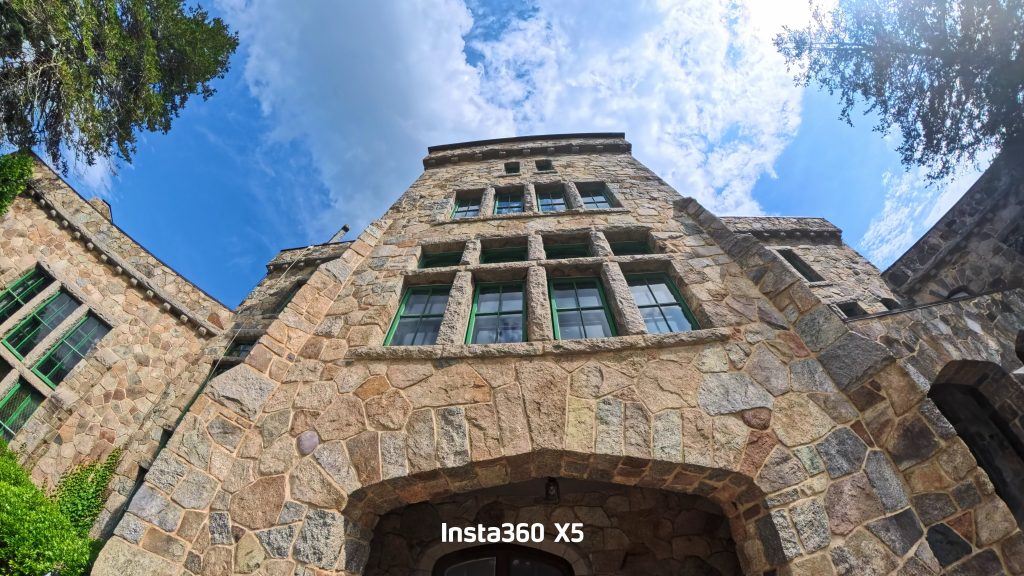
Using the Insta360 Mobile App with the X5 Camera
The Insta360 mobile app serves a variety of purposes. It allows the camera to be set up and controlled remotely. It also serves as a remote (real-time) viewfinder while filming and allows content to be previewed from a smartphone or tablet. The same mobile app serves as the gateway to the Insta360+ cloud service.

Once content has been previewed and edited, it can be shared with others from directly within the Insta360 app. Also baked into the app is access to a wide range of tutorial videos that explain exactly how to use every function built into the camera. Some of these videos explain how to best use the camera in a variety of specialized shooting situations.

The app is also where users can share content with the Insta360 community, and for users to discover all of the creative ways people are using this camera to capture specialized situations and add visually stunning effects to their content. The app can be used for this purpose even without the camera connected, so you can install the app and check it out before purchasing the camera.
Since a smartphone or tablet screen is much larger than the 2.5-inch touchscreen built into the Insta360 X5, I found that it’s more straightforward to navigate through the various camera menus and settings via the app.

Take Advantage of Genuine Insta360 Camera Accessories
The Insta360 X5 is a powerful and versatile camera. But when you use it along with the right accessories for specific shooting situations, it’s possible to capture more visually interesting content. For example, Insta360 offers a handful of mounts that allow the camera to be securely attached to someone’s body or the equipment they’re using to capture immersive, wide-angle content from a first-person, third-person, or 360-degree perspective.

Insta360 offers a variety of optional camera handles, mini tripods, and selfie sticks that provide further flexibility when capturing specific types of content from special angles. One feature I really like is that when using the Insta360 Invisible Selfie Stick, the camera automatically edits this accessory out of the video content.
And if you want to capture clear audio while the subject being filmed is at a distance from the camera, there’s the clip-on wireless microphone: the Insta360 Mic Air Transmitter. It’s a coin-size circular device that gets clipped onto a person or object. It has built in noise reduction, a wireless range up to 984 feet, and up to a 10-hour battery life. The mic is able to capture 48kHz, 24-bit audio, so it’s the perfect tool for narrating a video while filming it. The wireless mic is a must-have accessory for vloggers and content creators.
Beyond the optional accessories used to capture more visually interesting content in specialized situations, Insta360 offers a selection of padded cases, housings, lens covers, and other tools that provide enhanced protection for the camera and its dual lenses.
Here are my seven top picks for genuine Insta360 X5 accessories that are useful:
| Insta360 Camera Accessory | Price on Amazon |
| Invisible Selfie Stick | $25 |
| Foldable 2-in-1 Selfie Stick | $35 |
| Lens Cap | $7 |
| Fast Charge Case | $60 |
| Foldable Utility Handle | $25 |
| Wireless Microphone | $50 |
| Vertical/Horizontal Mount | $35 |
| Flexicare Protection | $32/year |
On Amazon and eBay, a variety of compatible (but not genuine Insta360 branded) Insta360 X5 accessories, mounts, and housings are also available.
Don’t Forget Extra Batteries and microSD Memory Cards
The Insta360 X5 comes with one rechargeable battery. However, if you plan to use the camera over extended periods of time, like when spending the entire day sightseeing while on vacation, I highly recommend investing in at least one or two extra X5 batteries (each sold separately for $45) and a fast-charging battery case (that can recharge two batteries at once in 28 minutes).

If you’re visiting an exotic vacation destination or shooting a once-in-a-lifetime experience as you participate in some sort of activity, the last thing you want is for the camera to have a drained battery and then need to fully recharge it before you’re able to keep taking pictures or shooting video.
Remember, a microSD card is required, but not included with the camera. This is where the photos and video you capture get stored within the camera. I suggest having at least two extra high-capacity microSD memory cards at your disposal, since shooting video takes up a lot of storage space and you never want to run out (forcing you to start deleting content while out-and-about so you can keep shooting).

Insta360 has its own line of microSD memory cards with your choice of 64GB, 128GB, 256GB, or 512GB capacity. For the Insta360 X5 camera, consider using at least a 256GB capacity memory card. As long as the memory card has a fast read/write speed, a UHS-I V30 (Class 10) rating, and is designed to be used in varying temperatures, you can use a microSD memory card from any brand, such as SanDisk, PNY, Samsung, or Lexar.
My Final Thoughts: Is the Insta360 X5 Camera Worth It?
There are dozens of action cameras available from Amazon or eBay that come from overseas and are manufactured and sold by no-name brands. Personally, I’d stay away from them altogether. Instead, choose an action camera from a well-known and reputable brand, like Insta360 or GoPro.
That said, if you want to be able to capture 360-degree video (or flat video) in up to 8K (30 fps), plus be able to capture high-resolution still images (at up to 72MP), there’s only one clear choice for which action camera to choose — the Insta360 X5. However, to get the best performance out of the camera, be sure to purchase the right collection of mounts and accessories for it, based on how and where you plan to use the camera.
Between the Insta360 X4 and X5 versions of the cameras, the company made some impressive upgrades. These relate to image stabilization, available shooting modes, improving battery life, and the ability to capture more vibrant and clear content in low light.
This camera has user-replaceable lenses (in case one gets scratches or cracked), slightly larger image sensors, and faster imaging chips. These added features allow the camera to shoot clearer, more detailed, and more vibrant video and photos that can easily be viewed, edited, and shared from a smartphone, tablet, or computer.
Insta360 X5 Action Camera
With an optional subscription to the Insta360+ service, syncing, viewing, editing, sharing, and archiving content in the cloud becomes a seamless and fast process. For this reason, I believe an Insta360+ subscription is a must for Insta360 X5 users. The Pro ($67/year) and Premium ($95) plans also include a replacement plan for the camera if it gets damaged.
Based on my testing and experience using multiple Insta360 action cameras, it’s easy for me to say that the Insta360 X5 is well made, nicely designed, intuitive to use, and generates visually impressive results. Yes, it’s a bit expensive, but for the added ability to capture 360-degree video and shoot video at up to 8K resolution, for many people the investment is well-worth it.
